Issue
- You receive an error starting with ACT or ECP during activation
- Troubleshooting activation errors (Windows)
- Activation error codes and messages
- Activation server or internet connection issues
- Earlier ESET products
Solution
Related solution: Android users
Troubleshooting activation errors (Windows)
If an ESET product fails to activate, an ACT error is displayed. To resolve this issue:
-
Remove any previously installed antivirus software using the vendor's approved method.
-
Verify you have an active internet connection. Your computer must have an active internet connection for your ESET product to activate and download updates.
-
Click Start and type
cmd. Right-click the Command Prompt icon and click Run as administrator.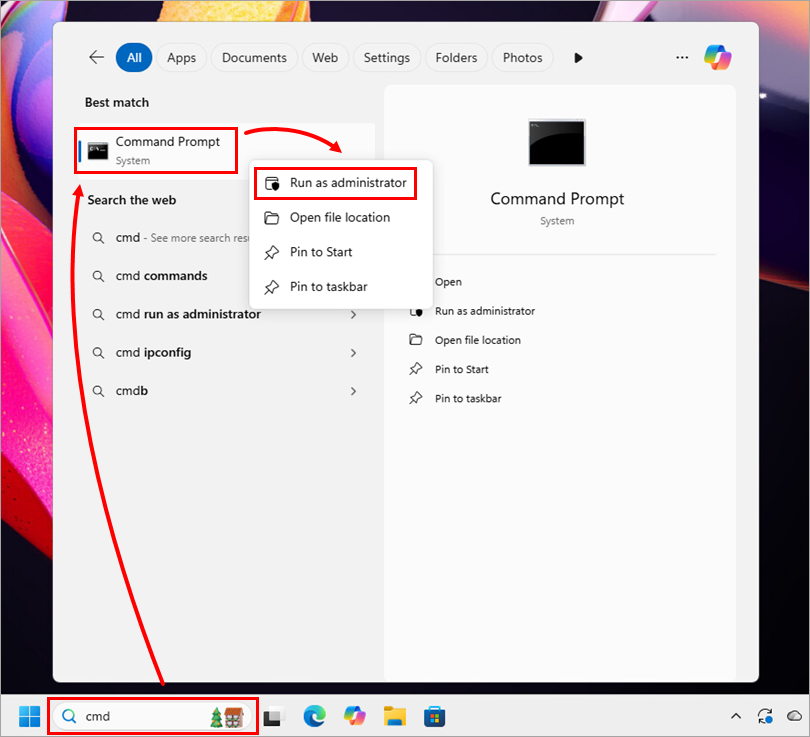
-
Type
netsh winsock resetand press Enter. Restart your computer and attempt to activate your ESET product again.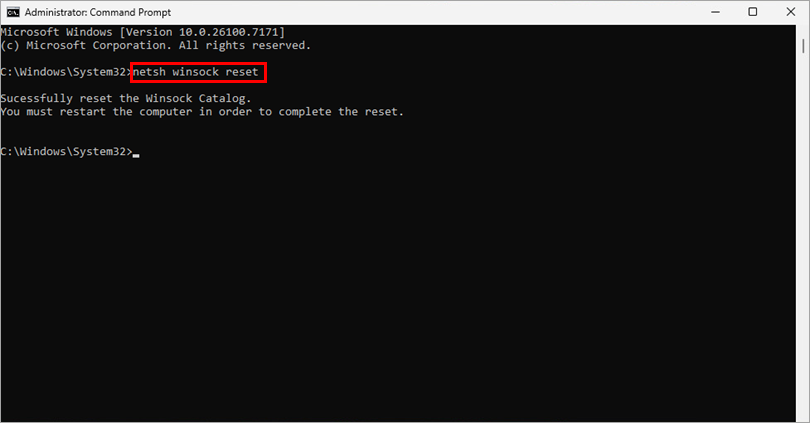
-
Errors can occur when the system time on your computer is set incorrectly. Set your system time properly to resolve this error.
-
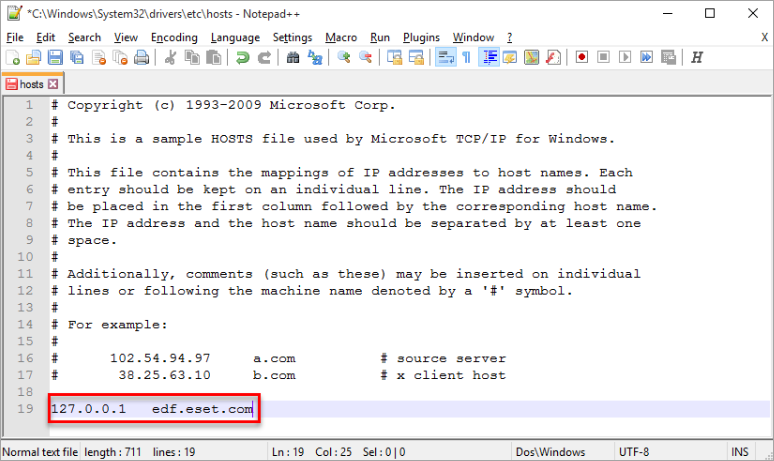
Navigate to
C:\Windows\System32\drivers\etcand determine if the hosts file contains any DNS-poisoned entries related to the "edf.eset.com" domain.If any DNS-poisoned entries are found, use a text editor (for example, Notepad or Notepad++) to remove all entries from the hosts file. This action requires Windows administration privileges.
See the complete ESET Activation Troubleshooting guide for more information and context about activation issues.
Need further assistance? Contact ESET Technical Support.
Activation error codes and messages
| Error code | Issue description and Troubleshooting |
|---|---|
| ACT.0 | If you receive this activation error, contact ESET Technical Support. |
| ACT.1 |
Activation was successful, but an error occurred. Determine if you have the latest version of your ESET product: |
| ACT.15 | If you cannot activate your product with an activation key, manually deactivate the seat in ESET HOME, ESET PROTECT Web Console, ESET PROTECT Hub or ESET Business Account and activate your product again. |
| ACT.17 |
Activation failed—Canceled subscription
|
| ACT.18 |
It is required to verify the activation with the parent (previous) subscription, which is already non-renewable or expired. |
| ACT.20 |
This subscription is not valid in the selected country. Your subscription must be activated in the country where it was purchased. Contact your local ESET partner to update your subscription. |
| ACT.21 |
This error typically occurs after upgrading your ESET product. To resolve this error, restart your computer and attempt to reactivate your ESET product: |
| ACT.23 | Activation failed, no usable unit distributions found. Your ESET PROTECT Hub or ESET Business Account does not contain any unit distributions suitable for activating this product. |
| ACT.24 |
Your ESET product is having trouble connecting to the ESET GEO IP server Verify that your network has rules allowing access to the ESET GEO IP servers. |
| ACT.25 | You may receive the ACT.25 error if you used your subscription previously with an ESET Beta product. To resolve this issue, contact ESET Technical Support. |
| ACT.32 ACT.34 |
Activation failed—An error occurred during activation Your activation key is not valid in the country you selected during installation. Select the proper country or contact your distributor. |
| ACT.39 |
Your subscription is overused. Possible solutions are:
When the subscription is no longer overused, attempt to activate your product again. |
| ACT.4 | This error may be caused by a failed upgrade or a corrupted installation. Uninstall any other antivirus/security software installed on your system that conflicts with your ESET product. |
| ACT.46 |
Your subscription has expired and must be renewed If you are receiving this error when your ESET product is new and you have not already activated it, contact ESET Technical Support. |
| ACT.5 |
Activation failed—Invalid activation key Type or copy/paste the activation key into your ESET product as it is written. If you receive an "Activation failed" error message, then the activation key you are using has already been activated, or you typed an incorrect activation key. When the key was activated, an email was sent out to the registered email containing an ESET-issued Username, Password, and activation key.
|
| ACT.6 | Your subscription has expired and is non-renewable. Your ESET product has to be activated using a different subscription. This error typically occurs when you try to activate a product using an expired trial subscription. |
| ACT.7 |
Activation failed Verify you downloaded the correct ESET product for the subscription you purchased. To download a different product, visit the download page. |
| ACT.8 |
An invalid username/password was used If you are a subscription owner and cannot log in, contact ESET Technical Support. |
| ACT.64 |
Activation failed Activation is temporarily unavailable due to too many failed attempts to type the correct activation key. You can try again later or use a different network. If a single IP address generates a high number of login attempts across multiple ESET HOME accounts, the IP address is automatically blocked. You can wait for a period of time, switch to a different network, or contact ESET Technical Support to request IP address unblocking. |
| ECP.4097 |
This error can occur when the system time on your computer is set incorrectly. Set your system time properly to resolve this error. If you are still unable to resolve your issue, contact ESET Technical Support. |
| ECP.4098 |
Your ESET product is having trouble connecting to ESET servers Verify your computer has an active internet connection. If you are still unable to resolve your issue, contact ESET Technical Support. |
| ECP.4099 |
We could not reach the activation server This is a known issue in Windows operating systems that may prevent activation of your ESET product under certain circumstances.
If you still cannot activate your ESET product, contact ESET Technical Support. We recommend including ESET Log Collector output when submitting a support request. |
| ECP.4100 |
If you are still unable to resolve your issue, contact ESET Technical Support. |
| ECP.4115 |
Invalid credentials You are trying to activate an ESET security product with ESET PROTECT Hub or ESET Business Account administrator credentials, but the username or password is wrong. |
| ECP.4116 |
This subscription is not valid in the selected country. Your subscription needs to be activated in the country where it was purchased. Contact your local ESET partner to update your subscription. |
| ECP.4127 |
Activation failed Activation is temporarily unavailable due to too many failed attempts to type the correct activation key. You can try again later or use a different network. This error is displayed when access to the ESET HOME account is blocked due to a detected brute-force attack. You can wait for a period of time or contact ESET Technical Support to request the ESET HOME account unblocking. |
| 0x00040027 (macOS) |
Your subscription is overused Possible solutions: When the subscription is no longer overused, try activating your product again. |
| 0x00000013 (macOS) |
Activate the Product Verify that you downloaded the correct ESET product for the subscription you purchased. To download a different product, visit the download page. If this does not resolve your issue, contact ESET Technical Support. |
Activation server or internet connection issues
| Error code | Issue Description and Troubleshooting |
|---|---|
| ECP.20002 |
We could not reach the activation server The following reasons commonly cause this error:
Verify you have an active internet connection Your ESET product is having trouble connecting to ESET servers. Verify that your computer has an active internet connection. Remove Lavasoft Web Companion In the Add/Remove programs window, Lavasoft may be displayed as "Web Companion" only. After Lavasoft is removed:
Under normal circumstances, you should be able to activate your ESET product. If not, that means your computer has a network/DNS/internet issue or third-party security software leftovers that block attempts to perform the activation. If you are still unable to resolve your issue, contact ESET Technical Support. |
| ECP.20006 |
Connection to the activation servers has been blocked/interrupted. Check for a firewall presence on your network. To resolve this issue, contact ESET Technical Support. |
| ECP.20016 | Proxy server settings have an invalid username or password to connect to the proxy. |
| ECP.20031 | Certificate validation fails Refer to Certificate validation fails when installing my ESET product. |
| ECP.20032 | The ESET servers are busy. Wait the specified amount of time provided in the error message, then try activating the subscription again. If you are still unable to resolve your issue, contact ESET Technical Support. |
| 0x00030000 (macOS) |
We could not reach the activation server This error commonly occurs when your computer is not properly connected to your network and your internet connection is inactive. |
| 0x1003000d (macOS) |
Verify you have an active internet connection Your ESET product is having trouble connecting to the ESET servers. Verify that your computer has an active internet connection. |
Earlier ESET products
| Error code | Issue Description and Troubleshooting |
|---|---|
| Error 0008 |
Type your ESET username and password again, or clear the update cache. |
| Error 0015 |
If you receive the messages "Activation failed" and "The activation key you entered has already expired" when attempting to activate your ESET product purchased from Staples, contact ESET Technical Support. Include your activation key and the proof of purchase number from your Staples receipt in your email. |
| Error 0097 |
Activation key is used for a different product Verify you downloaded the correct ESET product for the subscription you purchased. To download a different product, visit the Download Page. If you are still unable to resolve your issue, contact ESET Technical Support. |


