Solution
Related solution: Home and small office users
-
How can I contact my local ESET partner for support?
There are multiple ways to contact your local ESET partner for support. -
How do I purchase a subscription?
Purchase and download all ESET Business applications and solutions. Business customers can also request a quote from ESET Sales Support. -
How many subscriptions or seats do I need to purchase?
You purchase one subscription and change the number of seats based on your environment. One seat is required per operating system. For example, if you have a file server, print server, and three workstations, you must purchase a subscription with 5 seats.Be aware that some applications count subscription seats differently, for example:
- In ESET Mail Security for Microsoft Exchange Server, seats are counted per mailbox
- In ESET Endpoint Encryption, seats are counted per user
-
What if I need to purchase more than 15 seats for my business?
ESET offers custom security packages for all security solutions for small and medium (16-1999 workstations) to enterprise-scale (2000+ workstations) clients. -
How many seats do I need to purchase to protect virtual or thin clients or multiple client sessions on my server?
- Terminal servers: You need a subscription with a seat for ESET Server Security for Microsoft Windows Server on each of your instances (this application has the same features as ESET Endpoint Security/ESET Endpoint Antivirus for Windows, but can be installed on a terminal server). We recommend that you purchase an ESET PROTECT Entry subscription, which will allow you to install and activate ESET Endpoint Security/ESET Endpoint Antivirus for Windows and ESET Server Security for Microsoft Windows Server
- Virtual Desktop Infrastructure Environments (Citrix, VMware, etc.): You should purchase a subscription for the application you use on your Virtual Machines; the number of seats depends on the maximum number of VMs that run concurrently. For example, in an environment with 300 VMs to cover three shifts, with each shift consisting of 100 employees, you need to purchase a subscription with 100 seats to protect all VMs
-
How do I renew my subscription for ESET PROTECT On-Prem or ESET Mail Security for Microsoft Exchange Server?
You can renew your ESET PROTECT On-Prem or ESET Mail Security for Microsoft Exchange Server subscription by contacting your ESET-authorized reseller or contacting ESET Sales Support. -
How do I renew my subscription for ESET Mail Security or ESET Server Security?
Renew your subscription for these server applications by contacting your reseller or contacting ESET Sales Support. -
I just renewed my subscription using the same Activation Key, but my subscription is inactive. What's wrong?
It may take up to 12-24 hours for your subscription to be activated in the ESET database. Likewise, it may be 12-24 hours before you can download the latest application versions from our website. Your software will automatically update when the subscription becomes active. Your virus protection will remain active, and your computer will be secure during this period. -
What if I want to add, subtract, or combine my previous subscriptions before renewing?
Contact Sales Support for further assistance. -
Can I renew my subscription using ESET eStore?
If you are a self-managed customer, you can renew your ESET business subscription via the ESET eStore. -
Can I extend my subscription before the expiration date?
ESET does not currently offer a subscription extension program. However, you can renew up to 90 days before and 730 days after your subscription expires. If you decide to renew before your expiration date, your new expiration date will not take effect until your original expiration date passes.Example: If you renew on the 15th of this month and your expiration date is not until the 1st of next month, your new expiration date will not take effect until the 1st of next month.
-
I have lost or forgotten my subscription information.
If you have lost or misplaced your subscription details, visit the Lost ESET subscription site. -
How is ESET Security for Microsoft SharePoint Server subscribed?
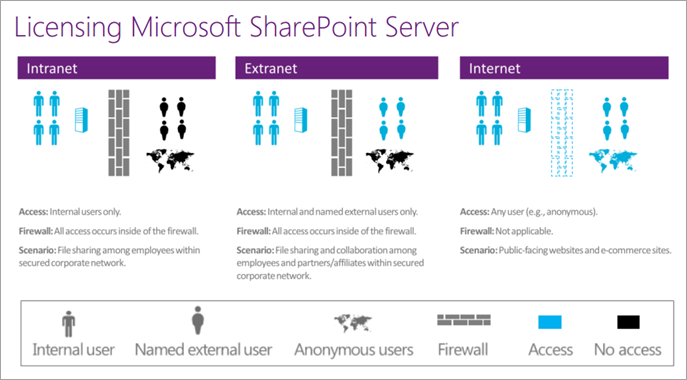
ESET Security for Microsoft SharePoint Server can be subscribed to in two ways, depending on how you (the user) subscribe and use Microsoft SharePoint Server. You have the option to choose either per server or per user subscription.Below, you can find an explanation of the differences between intranet, extranet, and internet websites—these concepts are important in calculating licensing for your Microsoft SharePoint Server and ESHP. For more information on Microsoft licensing for SharePoint Server, visit the Microsoft Volume Licensing Blog.
- Internal: Per Microsoft, if you are using Microsoft SharePoint as an internal-facing server (intranet or extranet), there will be a set number of named users who access your SharePoint database. In this arrangement, Microsoft SharePoint is subscribed to you by Client Access subscription (CAL) on a per-user basis. ESHP is subscribed to ESET by CAL to reflect the number of known users for your database when an internal configuration is used
- External: Per Microsoft, if you are using Microsoft SharePoint as an external-facing server (Internet) and have subscribed to Microsoft SharePoint on an unlimited-user basis, CALs are not required. ESET Security for Microsoft SharePoint Server is a subscription from ESET based on server count when an external configuration is used
-
I am unable to activate my ESET Server Security for Microsoft Windows Server.
If you received an activation error, see Resolve ACT or ECP errors during activation. -
What is ESET PROTECT Hub or ESET Business Account?
ESET PROTECT Hub or ESET Business Account (legacy portal) are online subscription management systems that enables ESET business subscription owners to manage all of their subscriptions in one place. -
How does ESET Mail Security for Microsoft Exchange Server count subscription seats?
ESET Mail Security for Microsoft Exchange Server counts subscription seats per mailbox. -
What are ESET protection tiers?
ESET protection tiers include multiple ESET applications for use under a single subscription. This enables you to protect all your computers, laptops, and smartphones with ESET solutions without purchasing individual subscriptions for each operating system. -
How do I activate an ESET business application on mobile devices?
There are multiple ways to activate ESET Endpoint Security for Android. The availability of a specific activation method may vary depending on the country and the means of distribution (ESET web page, etc.) for your application. Read more about activating ESET Endpoint Security for Android. -
Where can I download an invoice for my subscription?
Your ESET subscription invoice can be found in the email you received from ESET after your purchase. If you cannot locate your invoice, contact your reseller or ESET Sales Support. Note that invoices are not stored or generated in the ESET eStore or ESET PROTECT Hub.


