[KB7867] 向使用 ESET PROTECT 或 ESET PROTECT On-Prem 的客户发送模块更新任务

注意:

本页已由电脑翻译。点击本页面语言下的英文,显示原文。如果你发现有什么不清楚的地方,请联系你当地的支持。

问题

Required user permissions

This article assumes that you have the appropriate access rights and permissions to perform the tasks below.

If you are unable to perform the tasks below (the option is unavailable), create a second administrator user in ESET PROTECT or ESET PROTECT On-Prem with all access rights.

  • 模块更新失败:"下载更新文件时发生错误"

解决方案

终端用户

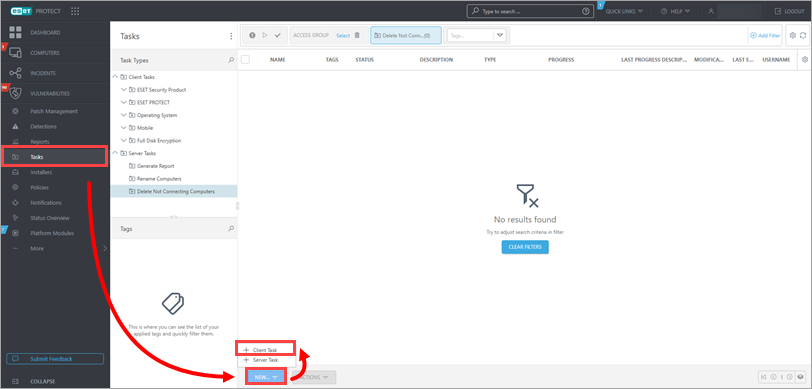
  1. 单击任务 → 新建 客户端任务

    图 1-1
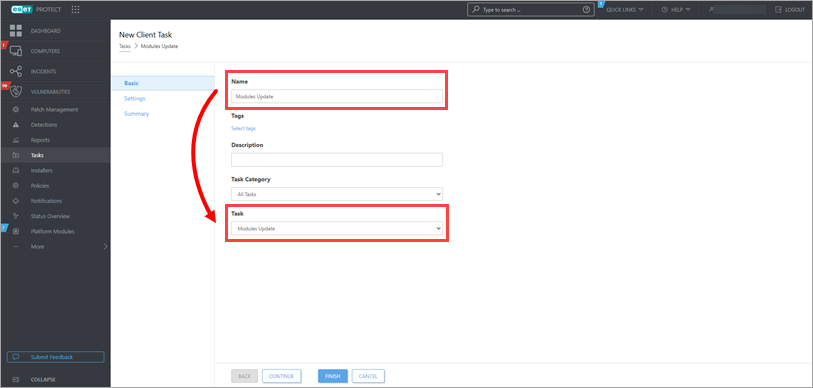
  1. 键入任务名称。从任务下拉菜单中选择模块更新有关模块更新的更多信息,请参阅我们的相关联机帮助主题。

    图 1-2
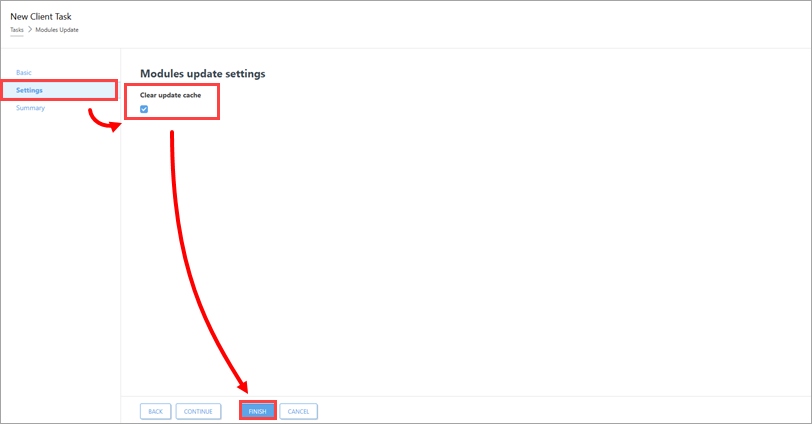
  2. 单击设置,选择清除更新缓存下的复选框,然后单击完成

    图 1-3
  3. 创建触发器并添加目标计算机