Issue
- After contacting ESET Technical Support, you were asked to recreate your issue and provide us with the ECP logs from your failed activation
- Enable Licensing advanced logging
Solution
Related solution: Home users
Enable Licensing advanced logging
-
Open the main program window of your ESET application for Windows .
-
Press the F5 key to access Advanced Setup.
-
Click Troubleshooting, expand Advanced Logging, enable Enable Licensing advanced logging and click OK.
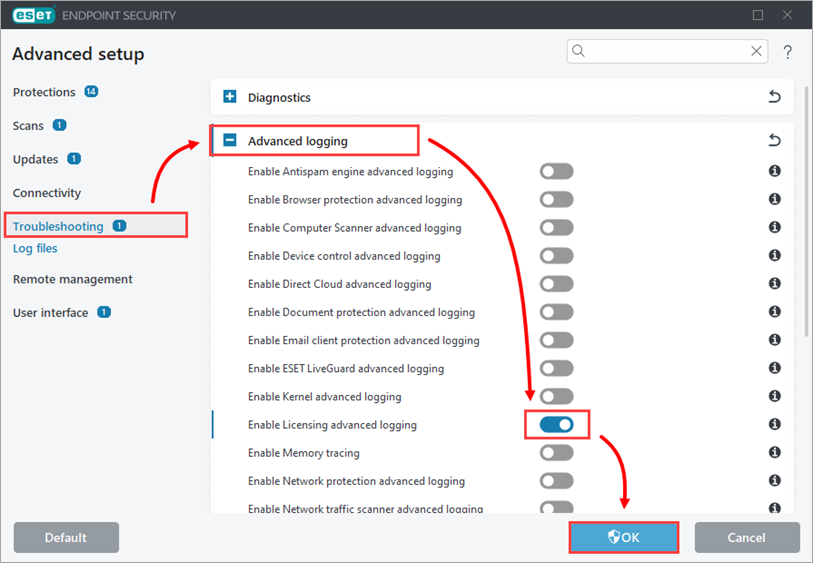
-
Attempt to activate your ESET application again to reproduce the error and generate the log.
-
Navigate to the ECP folder, located at
C:\ProgramData\ESET\ESET Security\Diagnostics\ECP. You may need to make hidden files visible to see this folder. -
Select all the log files, right-click them and then select Send to → Compressed (zipped) folder from the context menu to create a
.zipfile. -
If you have not already done so, open a case with ESET Technical Support before you submit your
.zipfile. -
Attach the
.zipfile to an email reply to ESET Technical Support. A Technical Support representative will examine the log and respond as soon as possible with the recommended action based on their findings.


