Issue
- You receive the error message "Error communicating with kernel"
Solution
Ensure the ESET Service is running
-
Press the Windows key + R key, type services.msc into the blank field and click OK. The Services window will be displayed.
-
Right-click the ESET Service (ekrn.exe) and select Properties from the context menu.
-
Verify that the Startup type is set to Automatic and the Service Status is Started, then click Apply → OK.
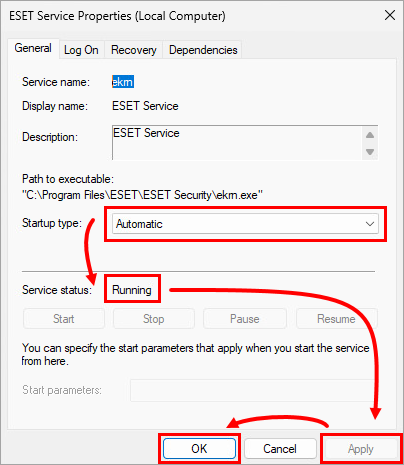
Figure 1-1 -
Restart your computer. If the issue is not resolved, Uninstall and reinstall your ESET product using the ESET Uninstaller tool.
Uninstall and reinstall your ESET product using the ESET Uninstaller tool
Use the ESET Uninstaller tool to perform a manual uninstallation and install your ESET product again.
Need further assistance? Contact ESET Technical Support.


