Issue
- Transition process from legacy subscription management systems (ESET Business Account and ESET MSP Administrator) to ESET PROTECT Hub
- ESET PROTECT Hub migration scenarios
Details
For more detailed information about the transition, click the expander below.
Click to expand
This article helps resellers understand how their business will transition from the legacy subscription portals (ESET Business Account and ESET MSP Administrator) to ESET PROTECT Hub. It provides:
- Detailed descriptions of the five possible reseller migration scenarios
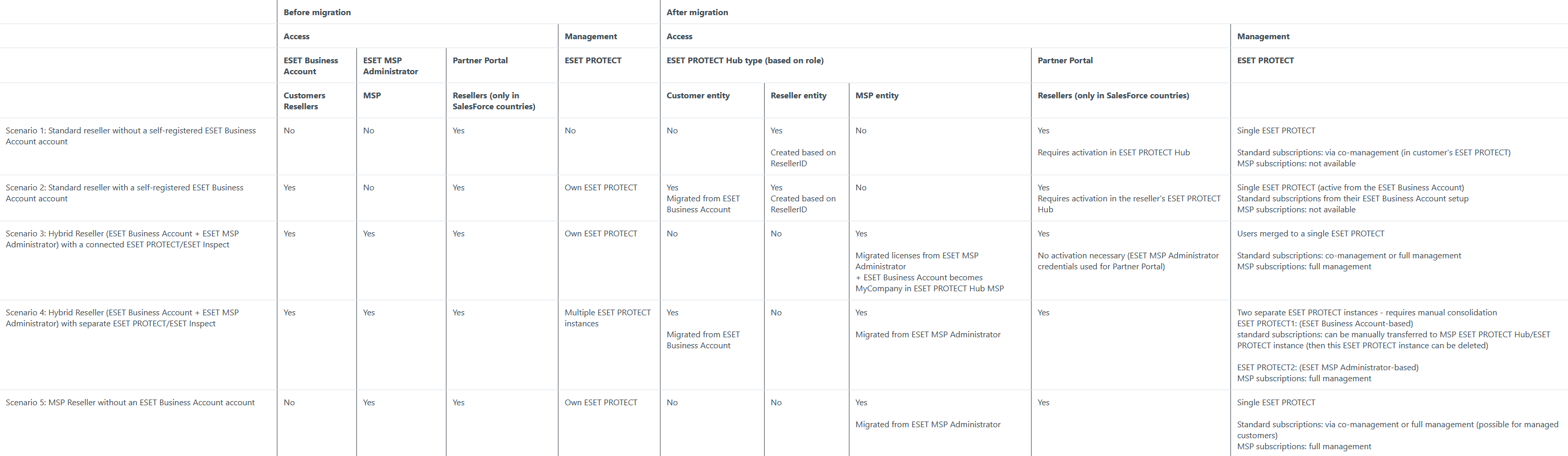
- A comparison table summarizing all scenarios
ESET PROTECT Hub is designed to serve multiple entities, including resellers, customers, and MSPs. To understand what your post-transition setup will look like, you first need to identify your current setup in relation to the existing tools: ESET Business Account and ESET MSP Administrator.
This article provides a high-level overview of all five reseller migration scenarios. It explains what happens before, during, and after migration, including Partner Portal access and post-transition options.
For detailed hybrid scenarios, see How hybrid ESET Business Account and ESET MSP Administrator scenarios will work in ESET PROTECT Hub. Review the information carefully to determine if these scenarios apply to your environment.
Partner Portal information
Sections mentioning Partner Portal may not apply to you. Applicability depends on whether your reseller business is linked to a branch office that has been onboarded in Salesforce.
For more details about the Partner Portal after migration, see Post-Transition Behavior for Channel Partners with Partner Portal user account. This article contains in-depth information about Partner Portal access and post-transition functionality, complementing the high-level overview in this guide.
Common migration facts
During migration:
- Migration is automatic; no reseller action is required.
- Access to legacy portals and cloud consoles is temporarily disabled during migration.
- Endpoint protection remains active throughout the process.
After migration:
- Legacy portals redirect to ESET PROTECT Hub.
- All subscriptions and active devices are preserved (history and audit logs are not migrated).
- Cloud consoles are accessible via the ESET PROTECT Hub Product Navigator.
Post-transition setup
For more details about the post-transition setup, see Channel Partner Post-Transition Guide. This article is relevant for all channel partners selling standard subscriptions and explains how to fully utilize ESET PROTECT Hub's features.
Solution
Migration scenarios
Choose a migration scenario based on your environment:
This scenario matches your environment if:
- You sell standard subscriptions via Partner Portal or Partner CRM
- You never created an ESET Business Account account
- You never used ESET MSP Administrator
- You do not manage customer security in cloud consoles
This scenario matches your environment if:
- You created an ESET Business Account account to manage your own security
- You may have added customer subscriptions to your ESET Business Account
- You never used ESET MSP Administrator
This scenario matches your environment if:
- You used both ESET Business Account and ESET MSP Administrator, and both were connected to the same ESET PROTECT/ESET Inspect
This scenario matches your environment if:
- You used both ESET Business Account and ESET MSP Administrator, but they used different ESET PROTECT/ESET Inspect
This scenario matches your environment if:
- You used ESET MSP Administrator exclusively
- You never selfregistered into ESET Business Account
- You managed customers only via MSP
Scenario 1: Standard reseller without a self-registered ESET Business Account account
Before migration: You sell standard subscriptions and do not have an ESET Business Account.
Outcome in ESET PROTECT Hub: You are invited to ESET PROTECT Hub as a standard reseller entity with full visibility of sold subscriptions and the ability to manage your own security via My Company.
After migration:
- Request Partner/Office to convert your ESET PROTECT Hub Reseller account to an MSP entity for full management capabilities
- Request co-management with customers who self-register in ESET PROTECT Hub
Limitations: Cannot fully manage customer security unless converted to an MSP entity.
Partner Portal note: You need to activate your ESET PROTECT Hub account to regain access to the Partner Portal. This step is critical, and any delays in activation may impact the reseller's ability to access the Partner Portal.
Scenario 2: Standard reseller with a self-registered ESET Business Account account
Before migration: You used ESET Business Account to manage your own security, and may have stored customer subscriptions in your ESET Business Account (unsupported workaround).
Outcome in ESET PROTECT Hub: Two entities are created in ESET PROTECT Hub:
- Customer entity (your migrated ESET Business Account)
- Reseller entity
After migration:
- Request Partner/Office to convert your ESET PROTECT Hub Reseller account to an MSP entity for full management capabilities
- Request co-management with customers who self-register in ESET PROTECT Hub
Limitations: You cannot fully manage customer security unless you convert to an MSP entity.
Partner Portal note: You need to activate your ESET PROTECT Hub account to regain access to the Partner Portal. This step is critical, and any delays in activation may impact the reseller's ability to access the Partner Portal.
Scenario 3: Hybrid Reseller (ESET Business Account + ESET MSP Administrator) with a connected ESET PROTECT/ESET Inspect
Before migration: You used ESET Business Account and ESET MSP Administrator, connected to the same ESET PROTECT or ESET Inspect. You used interconnected ESET Business Account and ESET MSP Administrator accounts via shared ESET PROTECT/ESET Inspect.
Outcome in ESET PROTECT Hub: Your accounts are automatically merged into one MSP entity (from ESET MSP Administrator), including My Company (migrated from ESET Business Account)
After migration:
- Fully manage customers' security via MSP or Standard subscriptions
- Request co-management with customers who self-register in ESET PROTECT Hub
Partner Portal note: Your ESET PROTECT Hub and Partner Portal credentials are unified. Access to the Partner Portal will be possible using the credentials previously used for ESET MSP Administrator; no activation is required.
Scenario 4: Hybrid Reseller (ESET Business Account + ESET MSP Administrator) with separate ESET PROTECT/ESET Inspect
Before migration: You used both ESET Business Account and ESET MSP Administrator, but each used a different ESET PROTECT/ESET Inspect.
Outcome in ESET PROTECT Hub: Two separate entities are created:
- MSP entity
- Customer entity
After migration:
- Perform optional manual consolidation of ESET PROTECT/ESET Inspect
- Fully manage customers' security via MSP or Standard subscriptions
Limitations: No automatic merge possible; manual consolidation required later.
Partner Portal note: Your ESET PROTECT Hub and Partner Portal credentials are unified. Access to the Partner Portal will be possible using the credentials previously used for ESET MSP Administrator; no activation required.
Scenario 5: MSP Reseller without an ESET Business Account account
Before migration: You manage customers exclusively via ESET MSP Administrator.
Outcome in ESET PROTECT Hub: You become an MSP entity in ESET PROTECT Hub with the ability to fully manage customer's security via both MSP or standard subscriptions.
Partner Portal note: Your ESET PROTECT Hub and Partner Portal credentials are unified. Access to the Partner Portal will be possible using the credentials previously used for ESET MSP Administrator; no activation required.
Comparison table