[KB7952] Enable or disable endpoint detection of potentially unwanted applications using ESET PROTECT or ESET PROTECT On-Prem

Details


Click to expand

A potentially unwanted or unsafe application is a program that contains adware, installs toolbars, or has other unclear objectives. There are situations in which a user may feel that the benefits of a potentially unwanted application outweigh the risks. ESET software enables a user to block or allow these programs.


Solution

Related Solutions: Endpoint users


ESET PROTECT

Required user permissions

This article assumes that you have the appropriate access rights and permissions to perform the tasks below.

If you are unable to perform the tasks below (the option is unavailable), create a second administrator user in ESET PROTECT or ESET PROTECT On-Prem with all access rights.

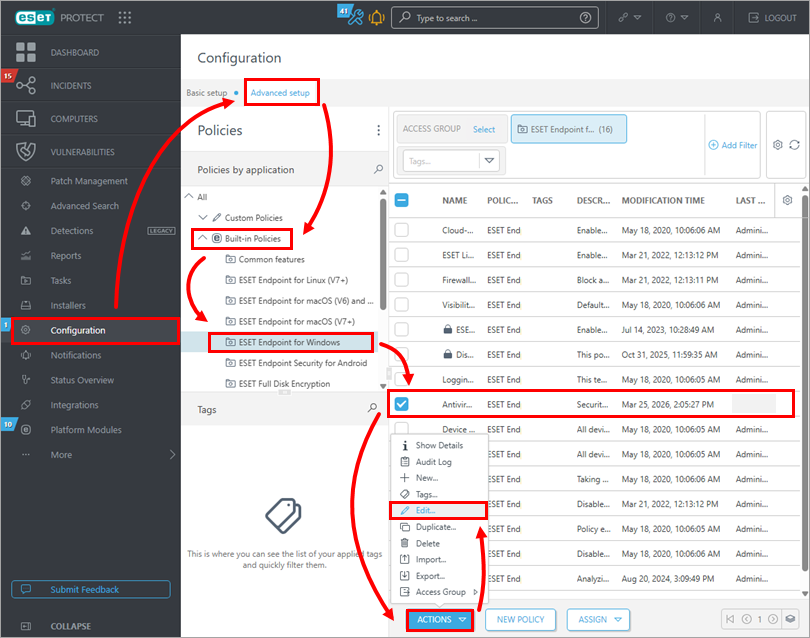
  1. Click ConfigurationAdvanced setupBuilt-in policies, select the desired application, then select the policy that you want to modify. Click Actions Edit.

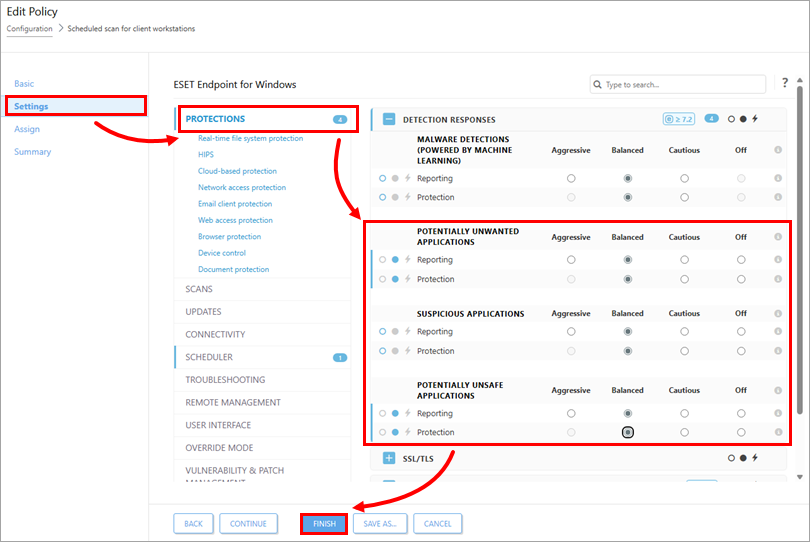
  1. Click Settings Protections, and turn on or off the detection of Potentially Unwanted Applications, Suspicious Applications, or Potentially Unsafe Applications. Select the radio button below for Aggressive, Balanced, Cautious or Off, according to your preference and click Finish.
Detection of potentially unwanted applications is not configured error

If the device shows the error "Detection of potentially unwanted applications is not configured", verify that your selected configurations are applied in the appropriate ESET Endpoint product policy.

  1. Open the policy, expand Settings and click Protections.

  2. In the Detection Responses section, verify that the circle to the left of the selected setting is blue, which indicates that the setting is applied in the policy.


ESET PROTECT On-Prem

Required user permissions

This article assumes that you have the appropriate access rights and permissions to perform the tasks below.

If you are unable to perform the tasks below (the option is unavailable), create a second administrator user in ESET PROTECT or ESET PROTECT On-Prem with all access rights.

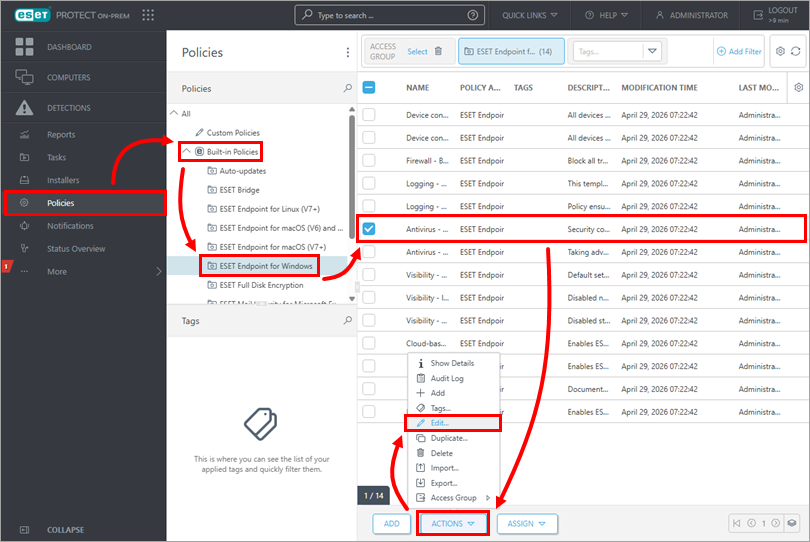
  1. Click Policies Built-in policies, select the desired application, then select the policy that you want to modify. Click Actions Edit.

  1. Click Settings Protections, and turn on or off the detection of Potentially Unwanted Applications, Suspicious Applications, or Potentially Unsafe Applications. Select the radio button below for Aggressive, Balanced, Cautious or Off, according to your preference and click Finish.

Detection of potentially unwanted applications is not configured error

If the device shows the error "Detection of potentially unwanted applications is not configured", verify that your selected configurations are applied in the appropriate ESET Endpoint product policy.

  1. Open the policy, expand Settings and click Protections.

  2. In the Detection Responses section, verify that the circle to the left of the selected setting is blue, which indicates that the setting is applied in the policy.