Issue
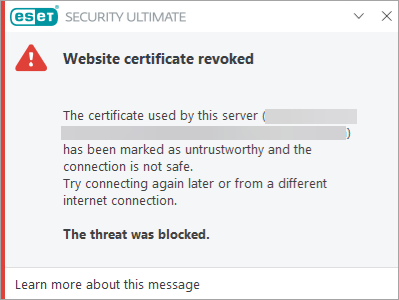
- Understand the "Website certificate revoked" warning
Solution
The "Website certificate revoked" warning appears because your ESET application has detected that a website’s security certificate is no longer valid.
If a security certificate is expired, revoked, or not updated correctly after replacement, the connection cannot be trusted, and the ESET application blocks it to protect you. This can refer to the website’s SSL/TLS certificate or to an intermediate certificate in the certificate chain (for example, the R3 certificate). Read more about resolving an expired R3 intermediate certificate.
This is not an issue with your ESET application or your device. The certificate must be fixed by the website owner, and there is no option to safely continue to the site until this is resolved.
You can use this tool to check a website's certificate chain. The results show both the SSL/TLS certificate and the intermediate certificates it depends on, helping you identify which certificate in the chain is causing the issue.
If you experience issues accessing trusted websites, clear your CRL (Certificate Revocation List) and OCSP (Online Certificate Status Protocol) cache.


