Issue
- Add ESET subscriptions or security admin credentials to ESET PROTECT On-Prem
- Log in to your account: ESET PROTECT Hub, ESET Business Account or ESET MSP Administrator
- Insert the offline activation file
Solution
Related solutions: Cloud users
Log in to your account: ESET PROTECT Hub, ESET Business Account or ESET MSP Administrator
ESET PROTECT Hub or ESET Business Account enables ESET business account owners to manage all of their subscriptions in one place. For more information, read the ESET PROTECT Hub Online Help or the ESET Business Account Online Help.
-
Click More → Subscription Management → Add. If a subscription is already added, click Actions → Add Subscription.

-
Click Log in to your account, type in the ESET PROTECT Hub, ESET Business Account or ESET MSP Administrator credentials, and click Add subscriptions.
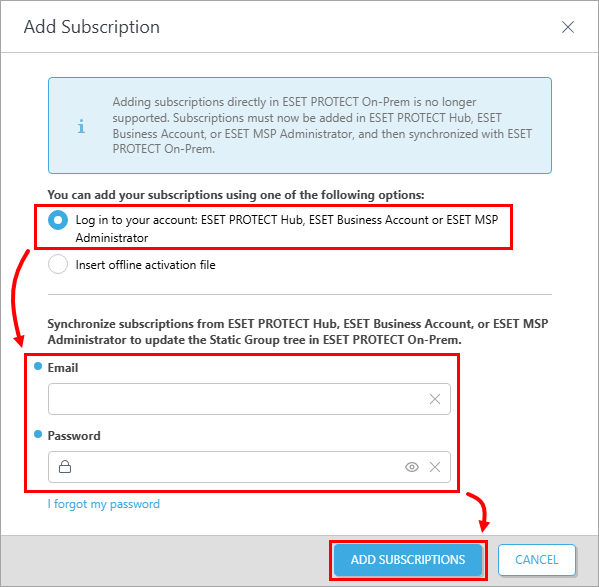
-
Subscriptions have been successfully added using ESET account credentials pop-up window will appear, confirming that the subscriptions were successfully added. Subscription(s) will appear in the Subscription Management list.
-
ESET PROTECT On-Prem now synchronizes your ESET PROTECT Hub, ESET Business Account or ESET MSP Administrator structure to the Static Group tree in Computers in the Web Console.
Insert the offline activation file
-
Create an offline activation file in the ESET Business Account or ESET PROTECT Hub, then download it.
-
Click More → Subscription Management → Add. If a subscription is already added, click Actions → Add Subscription.
-
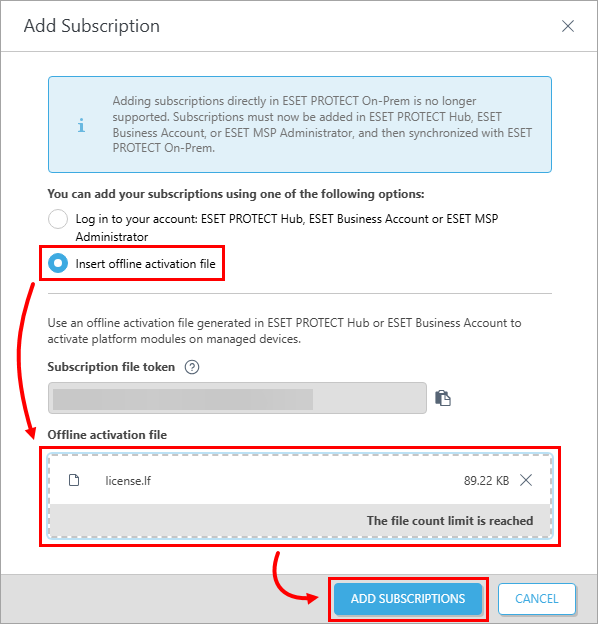
Click Insert offline activation file, click the the box under Offline activation file and select the .lf file in the Browse window. Click Add subscription to finish the activation process.
Troubleshooting
If you cannot add a subscription in ESET PROTECT On-Prem, see the following Knowledgebase resources for further assistance:
- ensure the edf.eset.com hostname and IP addresses are allowed in your network, click here for full list of addresses and ports to open for ESET PROTECT On-Prem
- troubleshoot proxy settings or temporarily disable HTTP Proxy
- see other known issues in ESET PROTECT On-Prem


