Issue
- Export a Server certificate, an Agent certificate, or a Certificate Authority (CA) public key from the ESET PROTECT Web Console for use during an ESET PROTECT On-Prem component installation
Details
Click to expand
As part of the installation process, ESET PROTECT On-Prem requires a peer Certificate Authority and a peer certificate for Agents. These certificates are used to authenticate applications distributed under your subscription. You can create new certificates for use on additional client computers. For example, a server certificate is required for the distribution of ESET server applications.
You may also want to create a new certificate to set specific parameters for a certain group of client computers. For example, a group of computers that will only be in use for six months might use a certificate with a different expiration date than other client computers.
Your Certificate Authority (CA) is used to legitimize certificates distributed from your network. In an enterprise setting, a public key can be used to automatically associate client software with ESET PROTECT On-Prem to enable remote installation of ESET applications.
Solution
-
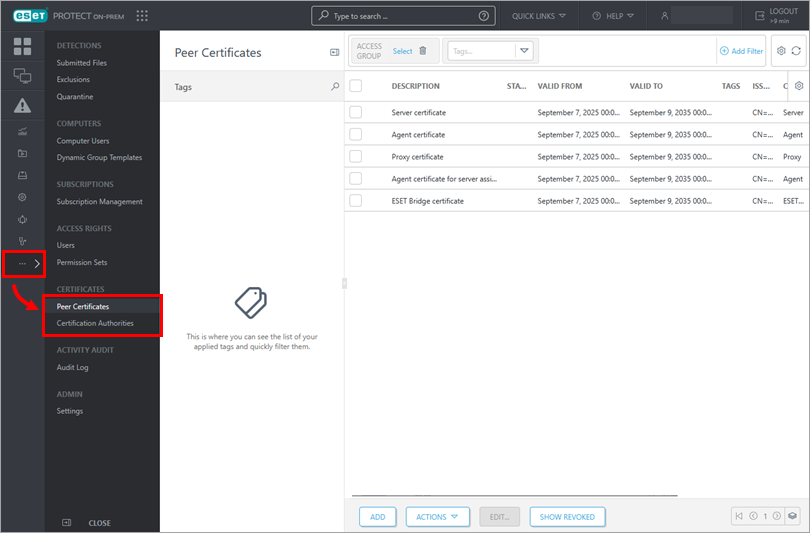
Click More and click Peer Certificates to export certificates or click Certification Authorities to export the public key.
-
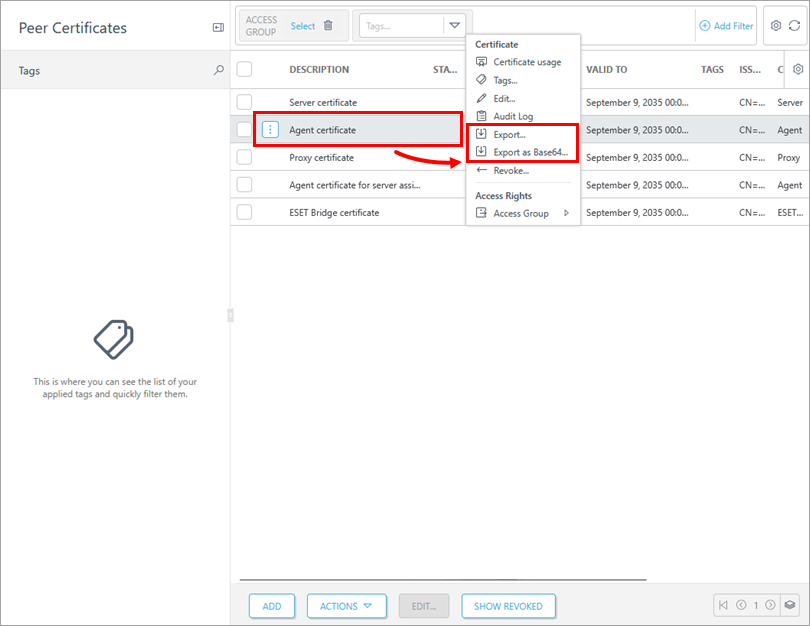
Click the appropriate certificate and click Export or Export as Base64. The type of certificate you export will depend on the component you are installing. Export a Server certificate when installing server components. Export an Agent certificate when installing the ESET Management Agent.
-
Export—Export your certificate (
.pfxfile ) or CA (.derfile). During product installation, the Setup Wizard will prompt you for this certificate -
Export as Base64—Export your certificate or CA as a
.txtfile. Open this file in a text editor to access your unique certificate or public key for use when creating a transformation (.mst) file or in other applications where it is necessary to type unique strings from your certificate or CA to submit your credentials
-


