Issue
- Create a log of connections blocked by the ESET firewall on devices with an ESET endpoint application
- Enable advanced network protection logging on devices with an ESET endpoint application using ESET PROTECT or ESET PROTECT On-Prem
- Activate logging of blocked connections on devices with an ESET endpoint application using ESET PROTECT or ESET PROTECT On-Prem
Solution
Related solution: Endpoint users
-
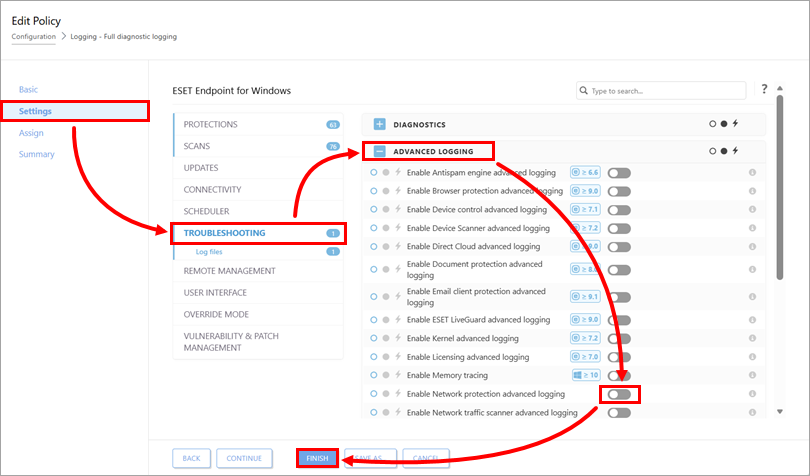
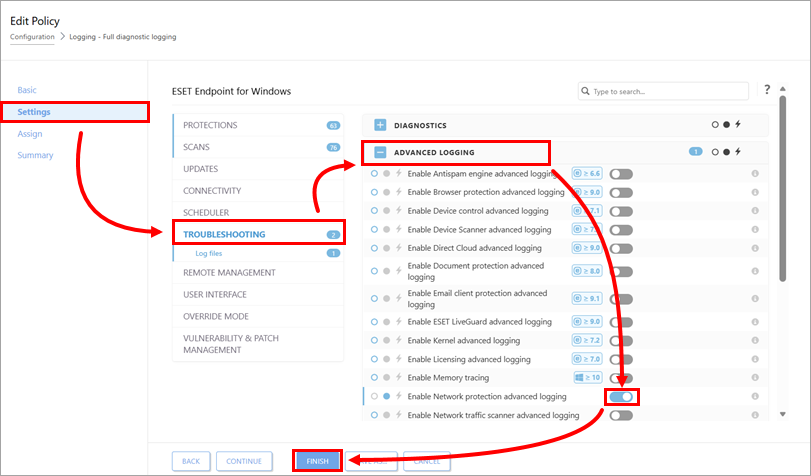
Click Settings → Troubleshooting. Expand Advanced logging and enable the Enable Network protection advanced logging toggle. Click Finish.
-
On the client devices, collect logs with ESET Log Collector. Share the log file with ESET Technical Support: If you already have a case open with ESET Technical Support, you can submit the log files as an email attachment when you respond to ESET. If you do not have a case open, contact ESET Technical Support.
-
Stop recording the logs: Disable the the Enable Network protection advanced logging toggle in the policy detail and click Finish.