注意事項
このページはコンピュータによって翻訳されています。このページの「言語」の「英語」をクリックすると、原文が表示されます。ご不明な点がございましたら、お近くのサポートまでお問い合わせください。
問題
ESET Endpoint Encryption Client and ESET Endpoint Encryption Server are separate applications from ESET Full Disk Encryption
The article below applies only to the ESET Endpoint Encryption Client or ESET Endpoint Encryption Server and not ESET Full Disk Encryption.
Visit ESET Full Disk Encryption support to view ESET Full Disk Encryption content.
- 問題を調査するため、ワークステーションのログを提出するようサポートチームから要請されました。
解決方法
ワークステーションログは、Enterprise Server のワークステーションの構成と現在のステータスに関する情報を含む HTML ファイルです。
- ESET Endpoint Encryption (EEE) Server にログインし、[ワークステーション] をクリックします。
- 影響を受けるワークステーションを選択し、 Details をクリックします。
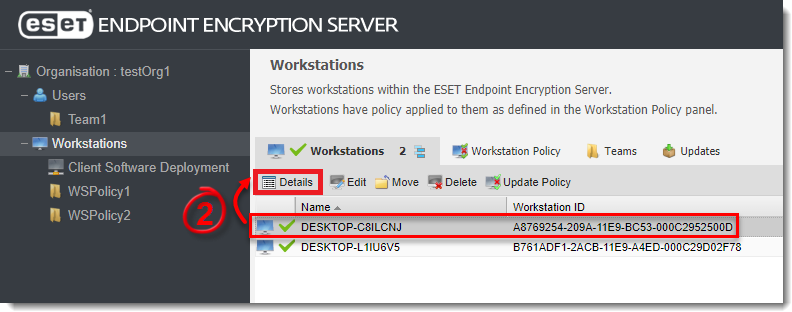
図 1-1
- Tools をクリックし、 Download Workstation Log を選択します。
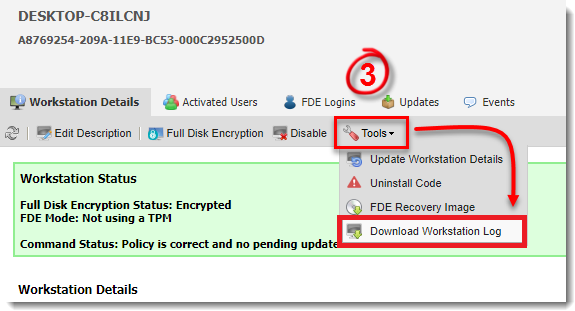
図 1-2
- ブラウザがファイルのダウンロードを促すので、「保存」をクリックします。


