• Small Office
  • ESET Small Business Security
  • KB3205

[KB3205] Access the Tools menu and Advanced setup in ESET Windows home applications

Issue

  • Access the Tools menu
  • Access Advanced setup

Solution

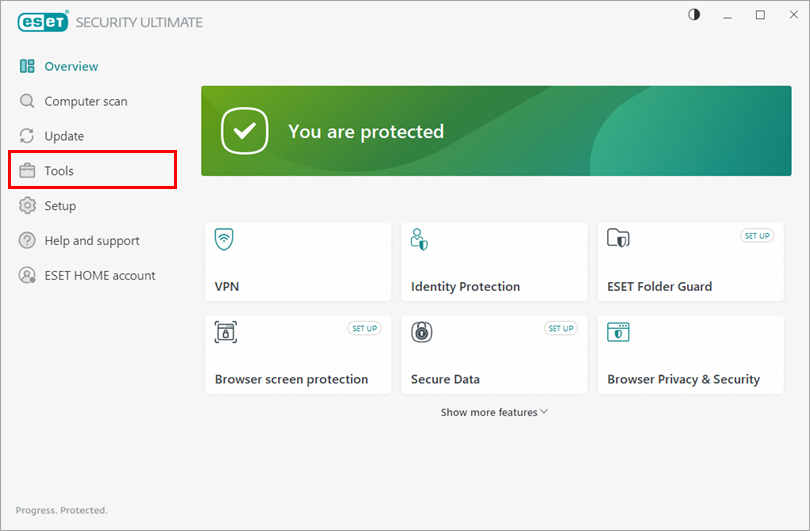
Access the Tools menu

  1. Open the main program window of your ESET Windows application.

  2. Click Tools.


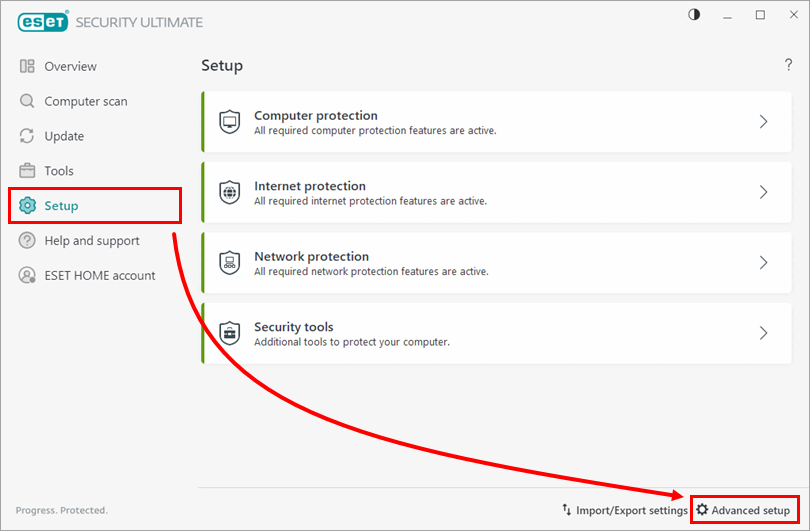
Access Advanced setup

  1. Open the main program window of your ESET Windows application.

  2. There are two ways to access Advanced setup:

    • Press the F5 key on your keyboard
    • Click Setup → Advanced setup
    Type in your Settings password

    You may be prompted to type a password to access Advanced setup.

English
Bahasa Indonesia
Česky
Dansk
Deutsch
Eesti
Español
Français
Italiano
Latviešu
Lietuvių
Magyar
Nederlands
Norsk (bokmål)
Polski
Português
Română
Slovenščina
Slovenský
Suomi
Svenska
Türkçe
Ελληνικά Greek
Български Bulgarian
Русский Russian
Українська мова
日本語 Japanese
简体字 simplified Chinese
한국어 Korean
Last Updated: May 15, 2026

Related articles:

  • Find the log files created by ESET small office and home products

Additional resources

User guides

ESET Forum

YouTube videos

ESET Support News ESET Customer Advisories ESET Status Portal ESET Technical Support

Existing customer?

Contact Privacy Legal information Report vulnerabilities Sitemap Manage cookies

© 1992 - 2026 ESET, spol. s r.o. - All rights reserved. Trademarks used therein are trademarks or registered trademarks of ESET, spol. s r.o. or ESET North America. All other names and brands are registered trademarks of their respective companies.