Issue
- Determine if you are using a 32-bit, 64-bit or ARM operating system on Windows 10 and 11
Details
Click to expand
Your active ESET subscription includes the 32-bit, 64-bit and ARM versions of your ESET endpoint product.
Solution

Click the
 Windows Key and press C. Click Command Prompt to open the console.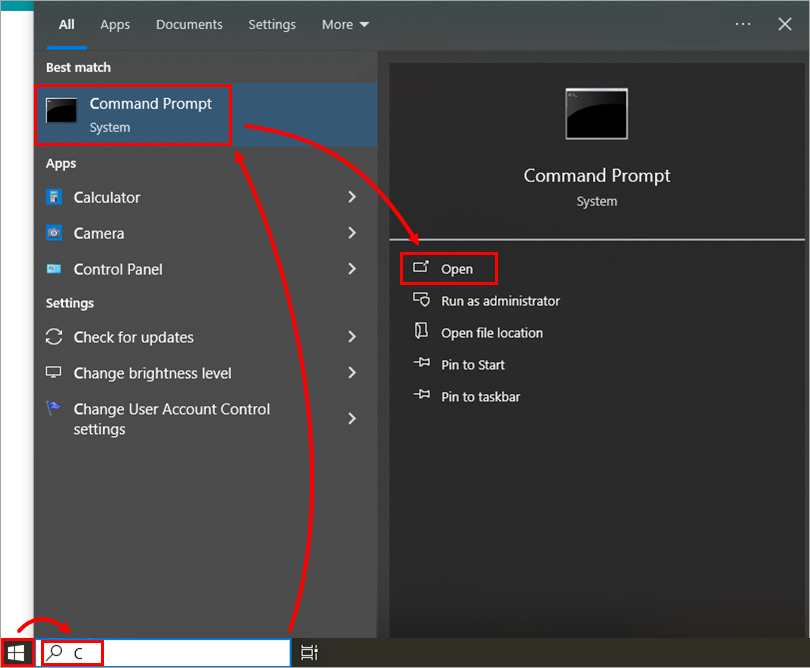
Figure 1-1 In the Command Prompt, type systeminfo and press Enter.
Scroll up and look for the System type section.
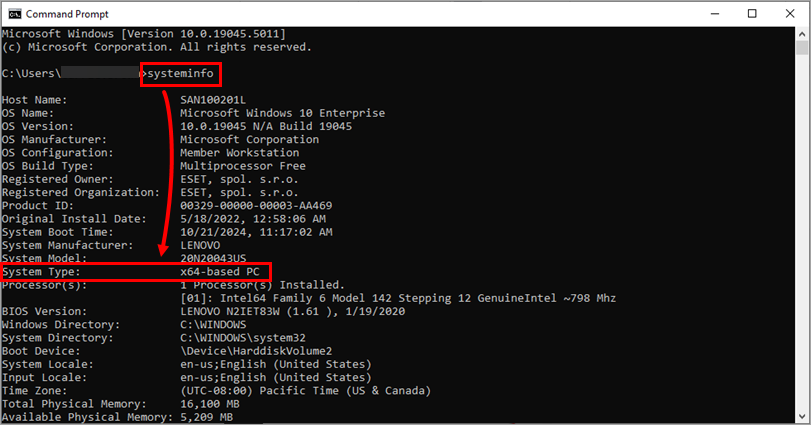
Figure 1-2 - If you see x64-based PC, you have a 64-bit system.
- If you see x86-based PC, you have a 32-bit system.
- If you see ARM-based PC, you have an ARM system.
- Download a .msi installer of ESET endpoint products according to your system type version.


