Issue
- ESET PROTECT On-Prem
- ESET PROTECT
- ESET Vulnerability & Patch Management
- ESET Endpoint Security and ESET Endpoint Antivirus for Windows
- ESET Endpoint Antivirus for Linux
- ESET Mail Security for Microsoft Exchange Server
- ESET PROTECT Hub
- ESET Business Account
- ESET MSP Administrator
- ESET Inspect On-Prem and ESET Inspect
- ESET Secure Authentication On-Prem
- ESET Endpoint Encryption
- ESET Endpoint Security for Android
- ESET Endpoint Security and ESET Endpoint Antivirus for macOS
- ESET Server Security for Linux
- ESET Direct Endpoint Management plugin for ConnectWise Automate
- ESET Direct Endpoint Management plugin for N-able N-central
- ESET Direct Endpoint Management plugin for NinjaOne
- ESET Direct Endpoint Management plugin for DattoRMM
Solution
ESET PROTECT On-Prem
- Generating PDF reports does not work for ESET PROTECT On-Prem 13.0 (and later) installed on Red Hat 10.
- When creating installers in ESET PROTECT On-Prem 13.0, the subscription may fail to prefill under heavy load. In such cases, the subscription must be selected manually.
- In version 11.0 and earlier, generating PDF reports does not work for ESET PROTECT On-Prem installed on Red Hat Enterprise Linux Server 8. To fix this issue, you can buy and install a third-party QtWebKit4 package. This issue is resolved in version 11.1 and later.
- Computer names written in Hebrew are unreadable after a report is exported. To fix this issue, Windows server users can enable language support. On the Windows server, navigate to Control Panel → Clock, Language, and Region → Region → Administrative → Change system locale, and select the check box next to Use Unicode UTF-8 for worldwide language support. Linux users must install additional left-to-right direction (LTR) compatible fonts.
- macOS Ventura (13) device reported as encrypted with third-party software even if it is not encrypted (and no ESET Full Disk Encryption options are offered). Workaround: Use a Software Install task (with an ESET Full Disk Encryption subscription) to install ESET Full Disk Encryption.
- When configuring the password-protected settings in an installer with ESET Endpoint Antivirus/Security version 9.0 or 9.1 for Windows, the settings may not be applied correctly. We recommend configuring password-protected settings directly in the ESET PROTECT Web Console by creating a policy and assigning it to specific computer groups to ensure the settings are applied accurately and consistently.
- When you upgrade to a higher protection tier (for example, from ESET PROTECT Advanced to ESET PROTECT Complete), your existing tasks and previously created installers will no longer function. You must recreate them to work with the higher protection tier.
- Rogue Detection Sensor configuration cannot be managed through console policies.
ESET PROTECT
- When certain cloud events occur—such as reimage, restore from snapshot, scale‑set operations, or clone-from-template—the VM’s cloud identity changes, even if the OS image (and the installed protection agent) stays the same. This creates a mismatch between what the cloud platform considers a “new VM” and what the agent considers the same machine.
- Typical failure modes: duplicate assets, orphaned agents, protection inconsistencies, confusing user experience
- Some synced Linux VMs cannot be protected because Secure Boot blocks the installation of the security application.
- To have a functional deployment of protection to EC2 instances for Linux in AWS, the protected account or organization needs to have AWS System Manager enabled, and EC2 instances need to have the SSM Agent installed.
- To deploy protection to GCP VM instances for projects that did not exist during the integration process or did not have billing enabled, the following must be configured manually:
- Enable required APIs:
- OS Config API (
osconfig.googleapis.com) - Ensure billing is enabled on the project
- OS Config API (
- Configure project metadata:
- Set
enable-osconfigtoTRUE - Set
enable-guest-attributestoTRUE - Set
enable-oslogintoTRUE
- Set
- Enable full features in VM Manager:
- In GCP Console, navigate to VM Manager → Project Settings and set the patch and config feature set to "Full" (
OSCONFIG_C)
- In GCP Console, navigate to VM Manager → Project Settings and set the patch and config feature set to "Full" (
- Enable required APIs:
- To run the integration CloudFormation template in an AWS Organization, Trusted Access for CloudFormation StackSets must be enabled. Without this setting, organization‑level templates fail because they rely on Service‑Managed StackSets, which require Trusted Access. The following must be configured manually before running the organizational CloudFormation template:
- Option 1: Trusted Access can be enabled through the AWS service activation page as described here: Enable trusted service access.
- Option 2: Trusted Access can be enabled through the AWS Console CloudFormation page as described here: Activate trusted access CloudFormation.
- Both options must be configured while signed in to the Management Account.
- To perform an AWS organization-level integration with the Default Host Management Configuration (selecting the No – setup will be included option during onboarding), the SSM Quick Setup onboarding process must be completed manually on organizations (if Quick Setup has never been used before in the given organization). Without this step, AWS does not automatically create the service roles required by SSM Quick Setup. These roles are necessary for the organizational CloudFormation template to run successfully. The following must be configured manually:
- In AWS Console, navigate to Systems Manager → Quick Setup.
- Click Finish onboarding. This must be performed while signed in to the Management Account of the AWS Organization.
- For Entra/Azure/GCP integrations, if the user does not have sufficient permissions to create the necessary resources for CWP integrations to work, the creation of the integration fails. To partially mitigate this issue, during the Setup Wizard, verify that the user has permissions to create a resource group and an Event Hub in the selected Azure subscription. For GCP, check if a user has permissions to create a project within their organisation. For AWS, we are not able to perform validation as the whole resource creation is being done via a CloudFormation template.
- macOS Ventura (13) device reported as encrypted with third-party software even if it is not encrypted (and no EFDE encryption options are offered).
- Workaround: Use a Software Install task (with an ESET Full Disk Encryption subscription) to install ESET Full Disk Encryption.
- MSP administrators using ESET Cloud Office Security cannot filter MSP customers in the ESET Cloud Office Security dashboard.
- Linux endpoint users on 11.x and later can activate Vulnerability & Patch Management; however, activation is limited to supported distributions. Therefore, V&PM cannot be activated on all Linux endpoints, and activation attempts will fail for unsupported distributions (even if incorrectly indicated as eligible in ESET PROTECT).
- Available patches shown in ESET PROTECT may not list all related dependencies for Linux endpoint and server applications v12.0 running on RHEL, Amazon Linux, Oracle Linux, AlmaLinux, or Rocky Linux. When these patches are applied, not-listed dependencies are also automatically upgraded.
- When you upgrade to a higher protection tier (for example, from ESET PROTECT Advanced to ESET PROTECT Complete), your existing tasks and previously created installers stop functioning. You must recreate them to work with the higher protection tier.
- Rogue Detection Sensor configuration cannot be managed through console policies.
ESET Vulnerability & Patch Management
- After scanning for vulnerabilities on MS Windows Server, the report does not display any vulnerabilities in the operating system.
- Linux endpoint 11.x and later users can activate Vulnerability & Patch Management; however, activation is limited to supported distributions. Therefore, V&PM cannot be activated on all Linux endpoints, and activation attempts will fail for unsupported distributions (even if incorrectly indicated as eligible in ESET PROTECT).
- Available patches shown in ESET PROTECT may not list all related dependencies for Linux endpoint and server applications v12.0 running on RHEL, Amazon Linux, Oracle Linux, AlmaLinux, or Rocky Linux. When these patches are applied, not-listed dependencies are automatically upgraded as well.
ESET Endpoint Security and ESET Endpoint Antivirus for Windows
- "The installed operating system is outdated" application status is displayed in ESET Endpoint Antivirus and ESET Endpoint Security v11.0 and later, several days after the upgrade of the OS to Windows 11. The application status will disappear automatically after 7 days.
- "The installed operating system is outdated" application status is displayed on LTSB/LTSC builds of Windows 10.
- During a push install to client computers on the network, you may see the error message "Remote Registry Opening (ESET Security application Info) Result Code: 5 (Access is denied.)". This signifies a permissions conflict.
- Ransomware Remediation folder exclusions require manual post-editing for every entry to be functional—an asterisk needs to be appended.
- ESET actions are not present in the Windows 11 context menu after the application is installed via Windows RDP.
- Forwarding Desktop notifications to email does not work via proxy.
Check the permissions of a specific user
-
Click the Start button, type regedit and click the Registry editor icon on the left-side menu or press the Enter key.
-
Right-click HKEY_LOCAL_MACHINE and select Permissions from the menu.
-
In the Permissions for HKEY_LOCAL_MACHINE window, click Advanced.
-
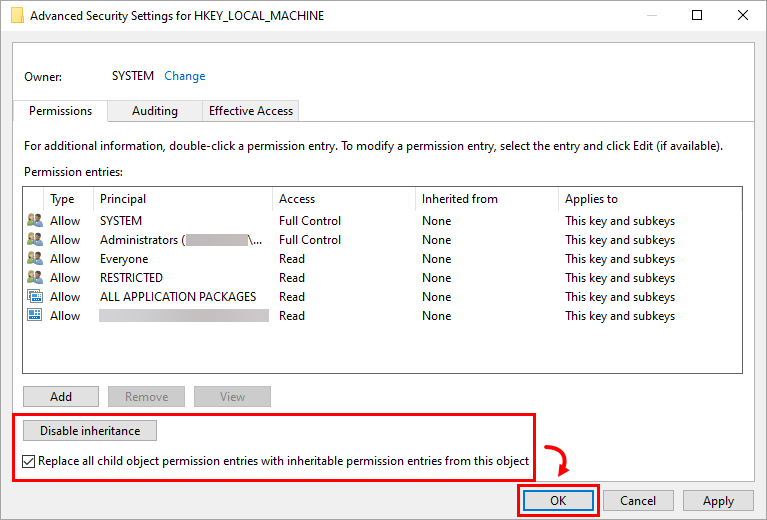
Verify that the button shows Disable inheritance and select the check box next to Replace all child object permissions entries with inheritable permissions entries from this object. Click OK.
-
Click OK to exit the Permissions window.
ESET Endpoint Antivirus for Linux
- Applications installed under Snap (e.g., Firefox) may not be scanned for known vulnerabilities, so their vulnerabilities may not be listed.
- Vulnerability assessment is not available in Linux Mint version 21.3
ESET Mail Security for Microsoft Exchange
- During the ESET Mail Security for Microsoft Exchange Server installation on a system with Microsoft Exchange Server 2013 SP1 installed, or when updating your Microsoft Exchange Server 2013 with SP1 while already running ESET Mail Security for Microsoft Exchange Server, you may receive the error message "0xC00CE503: MSG_E_COMMENTSYNTAX Incorrect syntax was used in a comment". To resolve this issue, apply the Microsoft hotfix.
- Vulnerability scans currently cannot list vulnerabilities for the Windows Server Operating systems.
ESET PROTECT Hub
- See the known issues in the ESET PROTECT Hub (the link is accessible only to registered ESET PROTECT Hub customers, and you must log in to view the content).
ESET Business Account
- ESA user quantity might exceed the specified margin.
- Activated EFSU and ESET Full Disk Encryption devices might not appear with an Offline subscription file after activation.
- ESET Cloud Office Security reactivation may result in issues.
- Multiple subscription removals might end in an unexpected error.
- Duplicated activated devices might appear when a subscription is migrated from the ESET License Administrator to the ESET Business Account.
- The number of activated devices displayed on the dashboard may not accurately reflect application usage.
- Downgrading a subscription to a Home application may not be applicable to an ESET Business Account.
- You can deactivate subscriptions with only up to 200 seats.
- Filtering by LastSeen status or sorting by ascending/descending order does not work in the Activated Devices section of EBA.
ESET MSP Administrator
ESET Inspect On-Prem and ESET Inspect
- ESET Inspect On-Prem (all versions): When installing or upgrading the ESET Inspect server using ESET PROTECT version 11.1, the user account used during the process must have the ESET Inspect server permission set and the Client task (the whole category) permission set for the installation or upgrade to work correctly.
ESET Secure Authentication On-Prem
- ESET Secure Authentication version 3.0.69.0 not sending radius attributes
- Cannot restart or reinstall the ESET Secure Authentication service (Active Directory integrated mode)
ESET Endpoint Encryption
- Uploading an EEE for a macOS client package into an ESET Endpoint Encryption server in non-multi-tenant mode will fail. You can verify the version number on the login screen. For example, 3.3.0.321 MT indicates the server is in multi-tenant mode. 3.3.0.321 indicates it is in non-multi-tenant mode and will experience failure.
- When installing a Windows Feature Update, the process fails with the message 0xC1900101 - 0x20017 The installation failed in the SAFE_OS phase with an error during BOOT operation.
- Some Dell Latitude systems fail to boot after being Full Disk Encrypted.
- In ESET Endpoint Encryption client versions 5.3.71 and 5.3.75, after initiating Full Disk Encryption on a computer managed by Direct Endpoint Management (DEM), Safe Start will fail, and encryption will not start. Continue using the previous version of the ESET Endpoint Encryption client until the bug fix is released in a later version.
DELL systems fail to boot after ESET Full Disk Encryption
The following DELL Latitude systems are known to be affected when Legacy BIOS is enabled, and SATA Operation is set to either AHCI or RAID On:
- E7250
- E7350
- E7450 (7000 Series Ultrabook)
- E5250
- E5350
- E5450
- E5550 (5000 Series Laptop)
Systems starting in UEFI mode are not known to be affected. Certain versions of the BIOS in these DELL Latitude systems are known to have a bug, which causes Full Disk Encryption to be unable to access the disk correctly during start. A black screen with a flashing cursor appears when you start your computer.
This can occur immediately after the system is Full Disk Encrypted, or at a later time after numerous successful restarts. This affects not only ESET Endpoint Encryption Full Disk Encryption but also many other manufacturers of disk encryption software.
A BIOS update provided by DELL might fix the issue.
ESET Endpoint Security for Android
- Due to changes in Stock Android by Google, ESET Endpoint Security for Android can no longer execute the relevant steps related to the Wipe command. To ensure at least some data security on Android 6 devices, this command behaves the same way as Enhanced factory reset. Among other things, for example, the process will ultimately result in a restoration to factory default settings.
- Due to changes in Android 7, Google enables the user to deactivate an active device administrator and uninstall the app in a single action. Users can now uninstall EESA without entering the admin password.
- If you have an active app on your Android 6 (Marshmallow) device with screen overlay permissions, you cannot grant permissions to any other app, including your ESET application. To enable permissions for your ESET application, you must disable screen overlay permissions for the app.
ESET Endpoint Antivirus and ESET Endpoint Security for macOS
Version 9.x (ESET Endpoint Security for macOS)
- Read-only rules in Device Control can sometimes trigger unusual system behavior the manipulating removable media.
- V&PM issues - macOS Scanning and Patching not working on macOS 26 (Tahoe), as well as 3rd party applications patching is not working.
- The previous versions, 7.1 or 7.2, wrongly migrated TSN RTP settings from version 6. If the user upgrades from version 6 to a previous version of the 7.1 or 7.2 build, we highly recommend installing version 9, opening the RTP TSN → For all file operations settings, and disabling the Advanced heuristic setting. This setting was wrongly set to On by migration from version 6.
- The proxy password is not encrypted in the configuration dump.
- Full disk access is lost after the macOS Sonoma restart.
- This is a macOS issue that Apple knows about and will fix in upcoming minor macOS releases.
- We added a workaround for this, and the full disk access is not lost, at least on real hardware. It may still be lost in virtual environments. The workaround stays the same as for version 7.4.
Version 8.x (ESET Endpoint Security for macOS)
- The previous versions, 7.1 or 7.2, wrongly migrated TSN RTP settings from version 6. If the user upgrades from version 6 to a previous version of the 7.1 or 7.2 build, we highly recommend installing version 9, opening the RTP TSN → For all file operations settings, and disabling the Advanced heuristic setting. This setting was incorrectly set to On during the migration from version 6.
- The proxy password is not encrypted in the configuration dump.
- Full disk access is lost after the macOS Sonoma restart.
- This is a macOS issue that Apple knows about and will fix in upcoming minor macOS releases.
- We added a workaround for this, and the full disk access is not lost, at least on real hardware. It may still be lost in virtual environments. The workaround stays the same as for version 7.4.
Version 7.4 (ESET Endpoint Antivirus for macOS)
- The onboarding wizard is shown during the remote installation. When the onboarding wizard is running, the application does not communicate its statuses to the ESET PROTECT Web Console, resulting in the admin being unaware of the current state of the application.
- Workaround:
- Main Method: Create a dummy configuration file before launching the remote installation.
- Alternative Method 1: The local user exits the onboarding wizard.
- Alternative Method 2: After the installation, restart the endpoint device. This will exit the onboarding wizard, and the application will launch correctly.
- Workaround:


