Issue
- Enable pre-release updates to resolve an issue with an ESET application
- Switch back to a regular update
Details
Click to expand
Pre-release updates are thoroughly tested and will be released soon. Enabling pre-release updates gives you access to the latest application versions, including the most recent modules and bug fixes.
Solution
Related solution: macOS users
Enable pre-release updates to resolve an issue with an ESET application
-
Open the main program window of your ESET Windows application.
-
Press the F5 key to open Advanced setup.
-
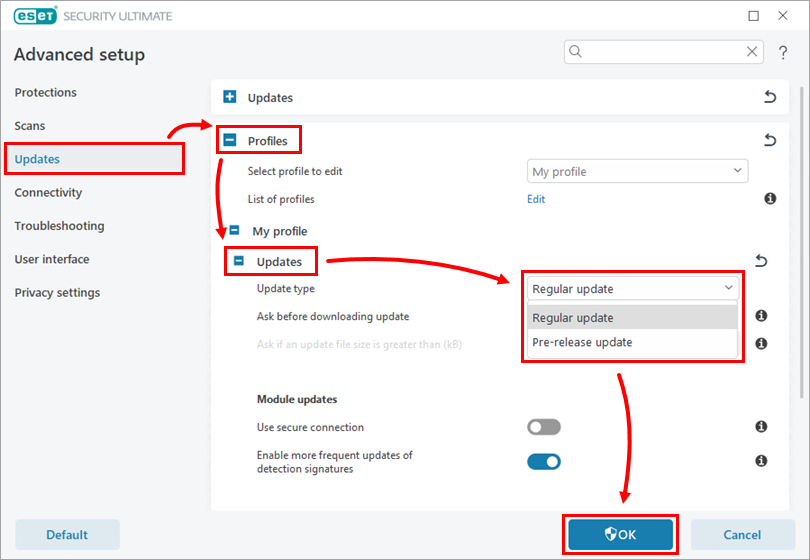
Click Updates, expand Profiles → Updates, select Pre-release update from the Update type drop-down menu, and click OK.
Switch back to a regular update
When your issue is resolved, or you no longer need pre-release updates, follow these instructions below to switch the Update type back to Regular update.
-
Open the main program window of your ESET Windows application.
-
Press the F5 key to open Advanced setup.
-
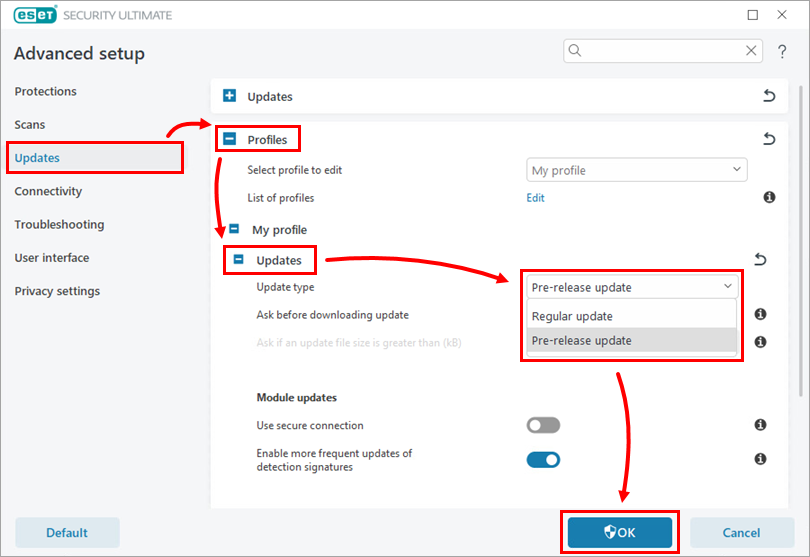
Click Updates, expand Profiles → Updates, select Regular update from the Update type drop-down menu, and click OK.