Issue
- You receive the "Disk enumeration failed" error in ESET Endpoint Encryption or ESET Full Disk Encryption while decrypting a workstation using a recovery media created with ESET Recovery Media Creator
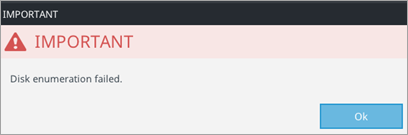
- Change the BIOS Disk Mode/SATA Mode on the workstation you are decrypting
- Use a different recovery media type
- Submit the recovery logs to ESET Technical Support
Solution
Change the BIOS Disk Mode/SATA Mode on the workstation you are decrypting
-
In the workstation's UEFI/BIOS settings, change the BIOS Disk Mode/SATA Mode from RAID to AHCI.
-
Attempt to decrypt the workstation with the recovery media again.
-
If you still cannot decrypt the workstation, use a different recovery media type.
Use a different recovery media type
If you originally created the recovery media using the Win RE USB 64 bit option in ESET Recovery Media Creator, try creating it using the EFI USB 32 & 64 bit option instead.
-
Insert an empty USB drive into your computer.
-
Run the utility and click Next.
-
Click EFI USB 32 & 64 bit.
-
Attempt to decrypt the workstation using the new recovery media.
-
If you still cannot decrypt the workstation, submit the recovery logs to ESET Technical Support.
Submit the recovery logs to ESET Technical Support
Obtain the ESET Recovery Media Creator recovery logs and share them with ESET Technical Support.


