Issue
- Example scenarios for counting domain and local mailboxes
- Determine the number of Exchange-enabled mailboxes
- Resource mailboxes counted in Active Directory
Solution
ESET Mail Security for Microsoft Exchange Server checks the entire Active Directory of the host Exchange server to determine your total mailbox count. The Monitoring window in ESET Mail Security for Microsoft Exchange Server displays two mailbox count types: domain and local.
- The domain mailbox count reflects the total number of mailboxes in a specific domain to which the Exchange server (on which ESET Mail Security for Microsoft Exchange Server is installed) belongs.
- The local mailbox count reflects the count of mailboxes for the Exchange server where ESET Mail Security for Microsoft Exchange Server is installed.
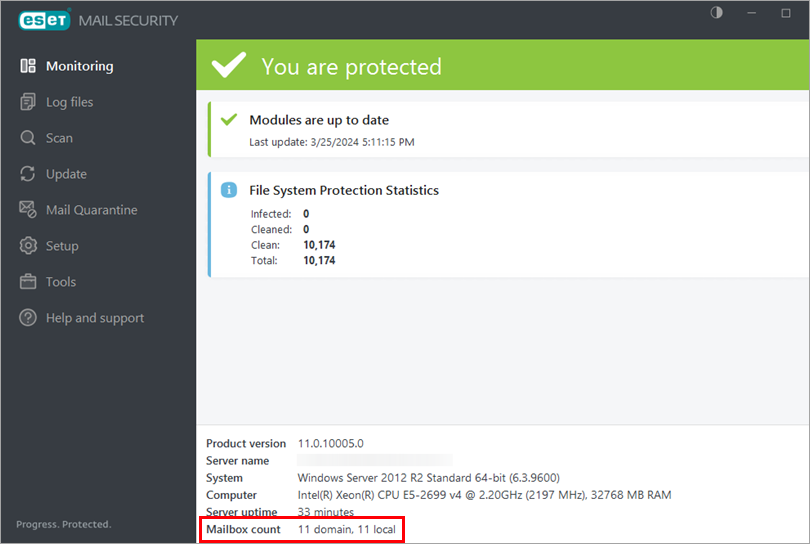
Resource mailboxes (for example, a conference room mailbox), email aliases, system mailboxes (used only for Microsoft Exchange Server internal purposes), and disabled mailboxes are not included in the mailbox count. In a clustered environment, nodes with the clustered mailbox role are not included in the mailbox count. General mailboxes such as "info@", "support@", or "mail@" are counted if they are related to existing physical mailboxes.
A mailbox is not counted if the address is an alias of another mailbox.
Example scenarios for counting domain and local mailboxes
Example 1
In this example, the abcd.com domain consists of five Exchange Servers:
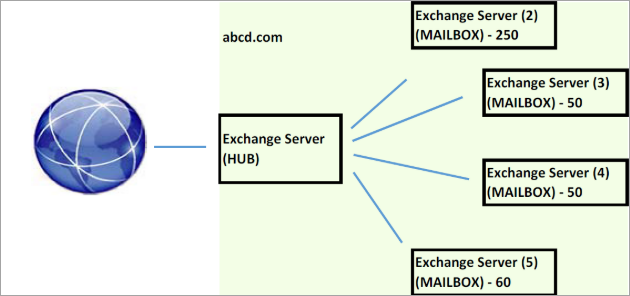
If ESET Mail Security for Microsoft Exchange Server was installed on the Exchange Server in the HUB role, we would see the following mailbox count in the backend of ESET Mail Security for Microsoft Exchange Server:
- domain: 410 (250 + 50 + 50 + 60)
- local: 0
If ESET Mail Security for Microsoft Exchange Server was installed on the Exchange Server (2) in the MAILBOX role, we would see the following mailbox count in the backend of ESET Mail Security for Microsoft Exchange Server:
- domain: 410 (250 + 50 + 50 + 60)
- local: 250
The active mailbox quantity reported for the subscription used for the ESET Mail Security for Microsoft Exchange Server installations would be 410.
Example 2
In this example, we have two domains, abcd.com and efgh.com, within an Active Directory. There is a trust relationship between those domains, and the ESET Mail Security for Microsoft Exchange Server subscription is being used in both domains.
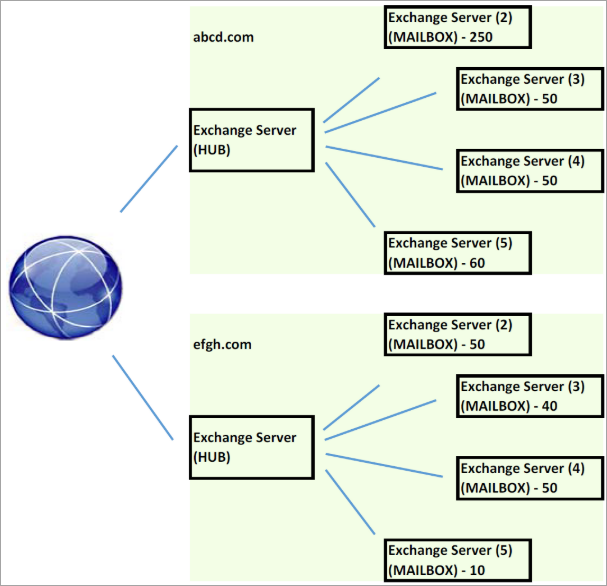
The number of domain mailboxes in domain abcd.com is 410; in domain efgh.com, it is 150.
If ESET Mail Security for Microsoft Exchange Server was installed in the domain abdc.com on an Exchange Server (2) occupying the MAILBOX role, we would see the following mailbox count in the backend of ESET Mail Security for Microsoft Exchange Server:
- domain: 560 (410 + 150)
- local: 250
If ESET Mail Security for Microsoft Exchange Server was installed in the domain efgh.com on an Exchange Server (3) occupying the MAILBOX role, we would see the following mailbox count in the backend of ESET Mail Security for Microsoft Exchange Server:
- domain: 560 (410 + 150)
- local: 40
The active mailbox quantity reported for the subscription used for the ESET Mail Security for Microsoft Exchange Server installations would be 560.
Determine the number of Exchange-enabled mailboxes
To determine how many Exchange-enabled mailboxes you have, you can use the ESET Mail Security for Microsoft Exchange Server Mailbox Count tool or the Active Directory custom search.
ESET Mail Security for Microsoft Exchange Server Mailbox Count tool
-
Download the ESET Mail Security for Microsoft Exchange Server Mailbox Count tool.
-
Open a PowerShell window in the folder where you saved the tool and run the following command:
.\emsx_verifymailboxcount.exe /count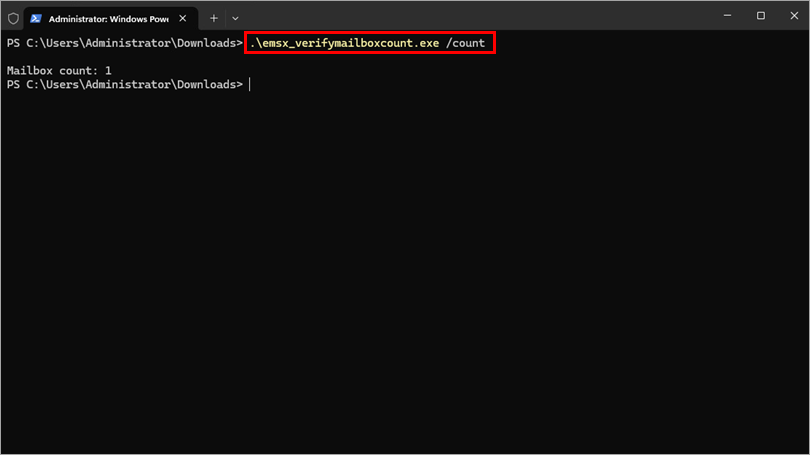
Active Directory custom search
-
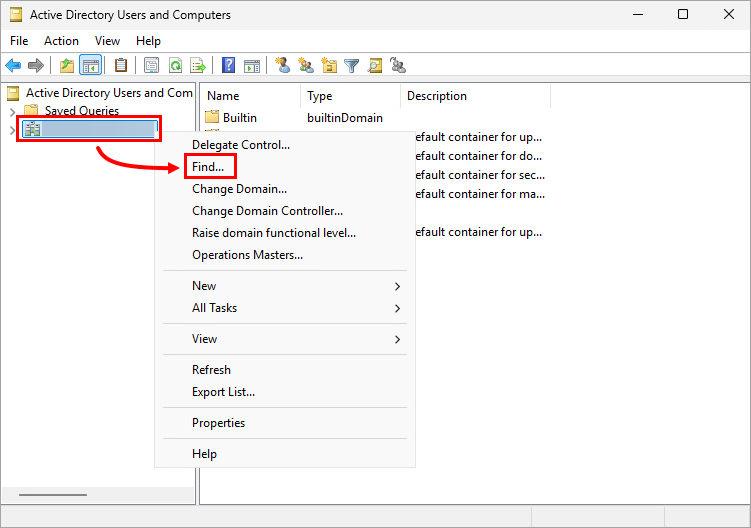
Open Active Directory Users and Computers on the server.
-
Right-click the domain and select Find from the context menu.
-
In the Find drop-down menu, select Custom search, click the Advanced tab, copy/paste the following Lightweight Directory Access Protocol (LDAP) query into the Enter LDAP query field, and click Find Now (for Exchange 2013, the health mailboxes are not tallied in the count):
(&(objectClass=user)(objectCategory=person)(mailNickname=*)(|(homeMDB=*)(msExchHomeServerName=*))(!(name=SystemMailbox{*))(!(name=CAS_{*))(!(name=HealthMailbox*))(msExchUserAccountControl=0)(!userAccountControl:1.2.840.113556.1.4.803:=2))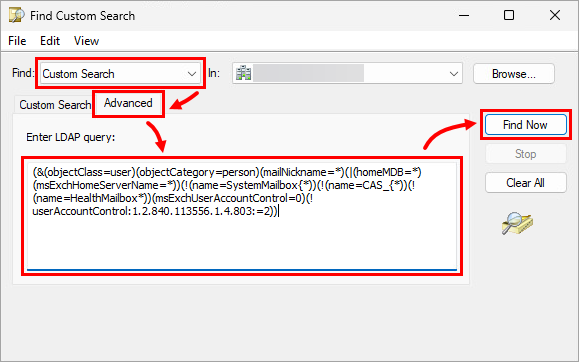
Resource mailboxes counted in Active Directory
The subscription verification mechanism in ESET Mail Security for Microsoft Exchange Server retrieves the number of mailboxes from Active Directory and counts all physical mailboxes for Active Directory accounts. If an account with a physical mailbox exists within Active Directory but is disabled, it is not included in the count. If you have resource mailboxes, such as a Room mailbox or Equipment mailbox, that are not actually being used, but accounts for these are enabled, they will be counted.
Based on the general settings recommendations for managing resource mailboxes, these mailboxes should be configured as follows:
- Room mailbox: This is a mailbox to be assigned specifically to Meeting Rooms; its associated user account will be disabled in Active Directory.
- Equipment mailbox: This is a mailbox specific to equipment (for example, televisions, projectors, etc.). As with a Resource mailbox, this type of mailbox creates a disabled user in Active Directory.
The ESET Mail Security for Microsoft Exchange Server algorithm does not count mailboxes with disabled accounts.
If the administrator account is enabled and can receive email messages assigned to the account, it could be compromised by malware or an infected email. For this reason, ESET Mail Security for Microsoft Exchange Server is designed to protect such mailboxes. If this mailbox is not in use, it may be disabled and not counted.
ESET subscription verification is built only to check valid mailboxes for which antivirus and antispyware solutions should be applied.


