問題
解決方法
Windows用ESETサーバーアプリケーションで自動除外を有効または無効にする
-
F5キーを押して詳細設定を開きます。
-
スキャン] をクリックし、[除外]→ [自動除外] を展開し、自動除外の横にあるトグルをクリックして有効または無効にします。OKをクリックして変更を保存する。
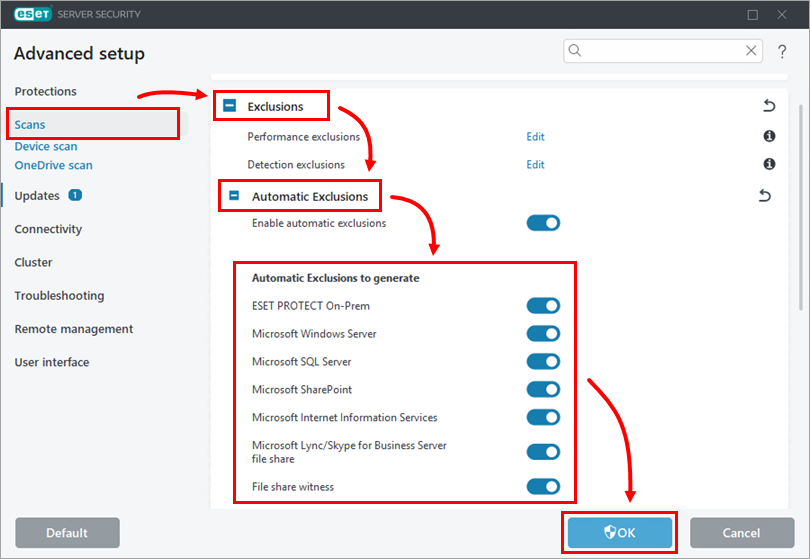
自動除外の詳細リスト
- ESET PROTECT オンプレム
- Microsoft Windows Server
- Microsoft SQL Server
- Microsoft Exchange Server
- Microsoft SharePoint
- Microsoft Internet Information Services (IIS)
- Microsoft Hyper-V
- Microsoft Lync/Skype for Businessサーバー
- Microsoft Lync/Skype for Business Serverファイル共有
- Microsoft Configuration Manager
- ケリオコネクト
- ケリオコントロール
- Microsoft ISAサーバー
- Microsoft Forefront 脅威管理ゲートウェイ
ESET PROTECT オンプレム
リモート管理者Microsoft Windows Server
Windows Update:
Dataastore.edb |
Datastore.edb |
Logs |
Edb*.jrs |
Windows セキュリティ:
.edb |
*.edb |
グループ・ポリシー:
グループ・ポリシー: %allusersprofile% |
NTUser.pol |
グループ・ポリシー: %allusersprofile% NTUser.polUser.pol %SystemRoot%System32 |
Registry.pol |
Active Directory:
Ntds |
Ntds.dit |
SYSVOL:
windir%Ntfrs |
jetsysedb.chk |
ステージング領域 |
Nntfrs_cmp*.*. |
Replica_Root\DO_NOT_REMOVE_NtFrs_PreInstall_Directory |
Ntfrs*.* |
Sysvol |
*.adm |
FRS(File Replication Service)とDFSR(Distributed File System Replication):
システム・ボリューム情報 |
$db_normal$ |
DHCP:
DHCP: %systemroot%System32 |
*.mdb |
DNS:
.log |
*.log |
WINS:
システムルート |
*.chk |
証明書サービス:
証明書サービス: %systemroot%xxxxsystem32 |
*.edb |
MSMQ
MSMQ: %SystemRoot%CacheSystem32 |
* |
ターミナル・サーバー・ライセンシング・サービス:
ターミナル・サーバー・ライセンス・サービス: %systemroot% regardsystem32 |
*.edb |
プリントサービス:
Print Service: %systemroot%xxxxxxspoolxxxxPRINTERS |
*.spl |
ページファイル:
C:⇄Pagefile.sys |
Windows Update Services:
C:¥WindowsSUS¥UpdateServicesDbFiles |
SUSDB.mdf |
Failover cluster:
\Device\CSVVolume?\* |
Windows Serverのバックアップ:
\Windows Server バックアップ: Windows Server バックアップ: Windows Server バックアップ: Windows Server バックアップ: Windows Server バックアップ: Windows Server バックアップ: Windows Server バックアップ: Windows Server バックアップ: Windows Server バックアップ: Windows Server バックアップ: Windows Server バックアップ: Windows Server バックアップ: |
BCD |
Windows Data Deduplication機能:
\\システムボリューム情報 |
\ChunkStore* |
Microsoft SQL Server
|
|
*.mdf |
|
|
*.bak
*.trn |
|
|
*.* |
|
|
*.* |
|
|
*.* |
|
|
*.* |
|
|
*.* |
[PROGRAM_FILESは、32ビットまたは64ビットのSQLインストールによって変わります。
[INSTANCE_ID は SQL インスタンス ID です。
Microsoft Exchange Server
Exchange Server の自動除外は、Microsoft の推奨事項に基づいています。ESET Mail Security for Microsoft Exchange Server は、ディレクトリ/フォルダ除外のみを適用します(プロセス除外と ファイル名拡張子除外は適用されません)。詳細については、以下の Microsoft Knowledgebase の記事を参照してください:
- Exchange Server のウイルス排除に関する最新情報
- 現在サポートされているバージョンの Windows を実行しているエンタープライズコンピュータに対するウイルススキャンの推奨事項
- Exchange 2007 におけるファイルレベルのウイルス対策スキャン
- Exchange 2010 におけるファイルレベルのアンチウイルススキャン
- Exchange サーバー(Exchange 2013)のオペレーティングシステム内のアンチウイルスソフトウェア
- Exchange 2016 サーバーでの Windows ウイルス対策ソフトウェアの実行
Microsoft SharePoint
SharePoint でファイルレベルのウイルス対策ソフトウェアを使用する場合、特定のフォルダをウイルス対策スキャンから除外する必要がある場合があります。
除外する
C:︓Program Files︓Common Files︓Microsoft Shared︓Web Server Extensions︓XXX[1]︓Logs |
*.log |
%WINDIR%¥Syswow64¥LogFiles¥SharePoint[4] |
*.log |
%WINDIR%System32\LogFiles\SharePoint[5] |
*.log |
SharePoint 2010:
C:¥Users¥Search_account[6]¥AppData¥Local¥Temp¥gthrsvc_SPSearch4¥[4] |
*.* |
C:■Documents and Settings■search_account[6]■Local Settings■Temp■gthrsvc_SPSearch4↩[5] |
*.* |
[XX は Microsoft SharePoint Server のバージョンを表します。
[2] -SharePoint 2010
[SharePoint 2013
[4] -64 ビット Microsoft SharePoint Server
[5] -32 ビット Microsoft SharePoint Server
[6] -SharePoint 検索サービスが実行されているアカウント名
SharePoint 2013:
SharePoint 2013としてSharePoint検索サービスを実行するアカウント名: C:¥Program Files¥Microsoft Office Servers¥Data¥Office Server¥Applications¥gthrsvc |
*.* |
Microsoft Internet Information Services (IIS)
IIS Temporary Compressed Files |
*.*(iis 5, iis 6) |
IIS Temporary Compressed Files |
*.*(IIS 7+) |
ASP Compiled Templates |
*.*(IIS 7+) |
ログファイル |
*\*.*.log(IIS 5, IIS 6) |
システムドライブ %systemdrive%inetpub\logs |
*\*ログ(IIS 7, IIS 8) |
メタベース.bin (IIS 5, IIS 6) |
metabase.bin(IIS 5)MetaBase.xml(IIS 6)MBschema.xml(IIS 6) |
.config (IIS 7+) |
*.config(IIS 7+) |
Microsoft Hyper-V
仮想マシン構成が保存されているフォルダーの除外:
Virtual Machines*.xml Virtual Machines Cache**.xml Virtual Machines Cache**.bin Virtual Machines Cache***.vsv Snapshots**.xml Snapshots***.bin Snapshots Cache***.vsv Snapshots Cache**.xml仮想ドライブ・ファイルの除外:
*.vhd *.avhd *.vhdx *.avhdxMicrosoft Lync/Skype for Business Server
%SystemDrive%RtcReplicaRoot*.*. Microsoft Lync/Skype for Business Serverファイル共有
ファイル共有の除外はデータベースから自動的に生成されます。
Microsoft 構成マネージャ
サーバ
Microsoft Configuration Managerinboxes |
"♪♪♪♪*.CIV""♪♪♪♪♪♪♪♪♪♪♪""♪♪♪♪♪♪♪♪♪♪♪♪♪""♪♪♪♪♪♪♪♪♪♪♪♪""˶**.SID""˶**.SMX""˶**.SMX""˶**.SMX""\**.XML""\*Pache*.ZIP" |
Microsoft Configuration Manager Logs |
\*\*LO_\*\*LOG |
Microsoft Configuration Manager EasySetupPayload |
\*\*¦Easy Setup Payload\*\*Ⱜ.CSV\*\*Ȃ.INI\*\*Ÿ JSON\*\*Ÿ XML\*\*XSD\*\*XSL\*\*XSLT\*\*Ÿ ZIP |
Microsoft Configuration Manager |
\*\*POL |
SMS_CCM ServiceData |
|
%Windir%CCM_ServiceData |
|
MCMスキームに基づく除外単位。
SCCMContentLib |
|
SMS_DP$ |
|
SMSPKG |
|
SMSPKGSIG |
|
SMSSIG$. |
|
位置による除外単位(例えば、D:㏄SMSPKGD$、G:㏄SMSPKGG$)。
|
|
Client
%Windir%CCM |
\*\*SDF |
C:Windows |
|
C:¦WindowsCCMSetup |
|
%Windir%CCM |
|
C:¥Program Files¥Microsoft Policy Platform¥authorityDb |
|
%Windir%CCM |
|
Kerio Connect
Kerio Connectのstoreフォルダが除外されます(例:C:︙Program Files︙Kerio︙MailServer︙store)。
Kerio Control
インストールフォルダが除外されます(例:C:㊟Program Files㊟Kerio㊟MailServer)。
Microsoft ISA Server
除外されます:
Microsoft ISA Server Exclusions: %ProgramFiles%Microsoft ISA Server*.* %ProgramFiles%Microsoft ISA ServerLogs*.* %ProgramFiles%Microsoft SQL Server*.* Microsoft Forefront 脅威管理ゲートウェイ
除外:
%ProgramFiles%Microsoft Forefront Thread Management Gateway*.* %ProgramFiles%Microsoft SQL ServerMSSQL10.ISARS*.* %ProgramFiles%Microsoft SQL ServerMSSQL10.MSFW*.* %SystemRoot%TempScanStorage*.* %ProgramFiles%Microsoft Forefront Threat Management GatewayWeb キャッシュおよびテキスト ログ用のディレクトリも除外されます。


