Kiadvány
- Az Ön ESET terméke észlelte a Win32/Merond.O fenyegetést
Megoldás
Az ESET a Merond.O önálló eszközzel távolítja el ezt a különösen ellenálló fenyegetést. A Merond.O malware fájlokat fertőz, és ezek megtisztításához a fertőzött számítógépen el kell indítania az eltávolító eszközt.
- Mentse az eszközt az asztalára a Mentés gombra kattintva, miután az alábbi linkre kattintott:
ESET Merond.O Cleaner letöltése
- Kattintson a Start
 gombra.
- Írja be a Command Prompt (Parancssorozat parancsot a Keresés indítása mezőbe.
- Kattintson a jobb gombbal a Command Prompt menüpontra, majd a kontextusmenüben válassza a Futtatás rendszergazdaként parancsot.
-Windows XP felhasználók: Kattintson a Start → Minden program → Tartozékok → Parancssor.
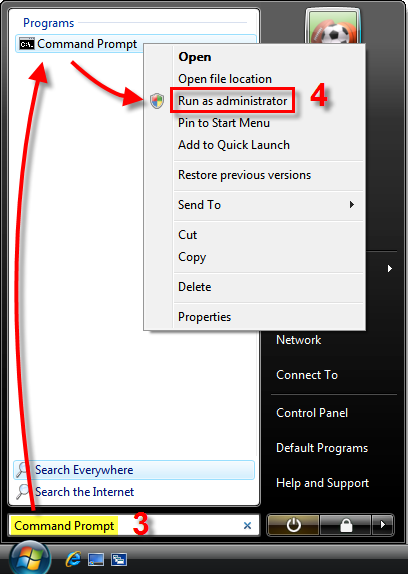
1-1. ábra
- A tisztítószer parancshasználata a következő:
ESETMerondOCleaner.exe
Follow the instructions below as an example of how to run the tool when saved to the C: drive:- Type cd Desktop.
- Type or paste the following command (To paste into the Command Prompt, you must right-click and select ‘Paste’ from the context menu as Ctrl + V will not work):
ESETMerondOCleaner.exe C:
- Press Enter and you will see Processing . . . followed by the infected files the tool has cleaned, or the files it has errors opening. This may take several minutes.
- Once the tool has completed, a backup file will be created for each infected file in the directory they are located and the file names will be appended with the extension
.org.If cleaned files work fine, delete the backup files *.org containing the Win32/Merond.O worm or they will be detected the next time you run a scan.
- Type cd Desktop.
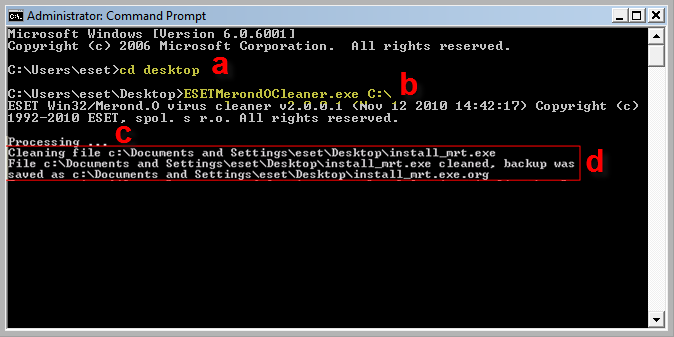
1-2. ábra
Need further assistance? Contact ESET Technical Support.


