Issue
- Enable ESET Managed Detection and Response (MDR)
- View the prerequisites for the automatic activation of ESET Managed Detection and Response (MDR)
- Verify that ESET Managed Detection and Response (MDR) is activated
Details
Click to expand
ESET Managed Detection and Response (MDR) provides 24/7 threat monitoring, detection, and incident response by combining AI and human expertise to protect against cyber threats, including breaches and ransomware. It identifies malicious activity, groups it into incidents, and, when attacks are confirmed, stops escalation and blocks unauthorized access. The service offers immediate visibility into incidents, countermeasures, and monitored activity, and sends critical, weekly, and monthly reports.
Solution
Prerequisites
- An ESET PROTECT MDR or ESET PROTECT MDR Ultimate subscription added to your ESET PROTECT Hub or ESET Business Account (EBA).
- The ESET Inspect module activated in your ESET PROTECT Hub or ESET Business Account (EBA).
- ESET Inspect Connector deployed on the client devices where you want to use the ESET MDR Service. You can trigger an automatic deployment of the ESET Inspect Connector from Platform Modules or deploy it manually.
When the prerequisites are met, ESET MDR is automatically activated on the client devices with the ESET Inspect Connector deployed. You can verify that ESET MDR is activated in ESET PROTECT.
Verify that ESET Managed Detection and Response (MDR) is activated
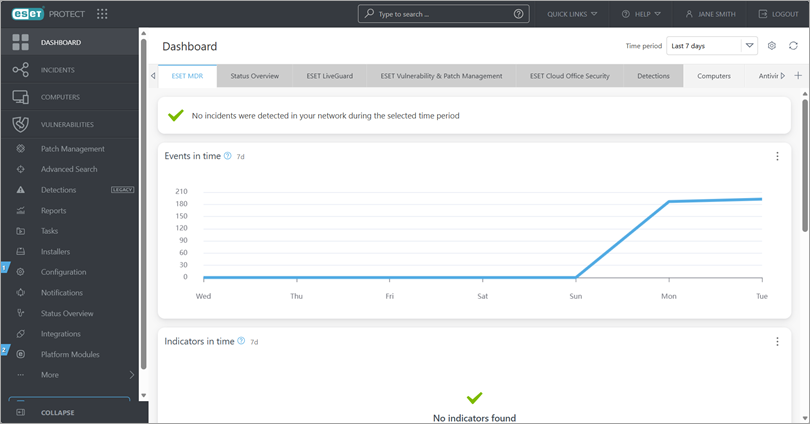
When the ESET MDR Service is activated, an active ESET MDR tab appears in the ESET PROTECT Web Console.
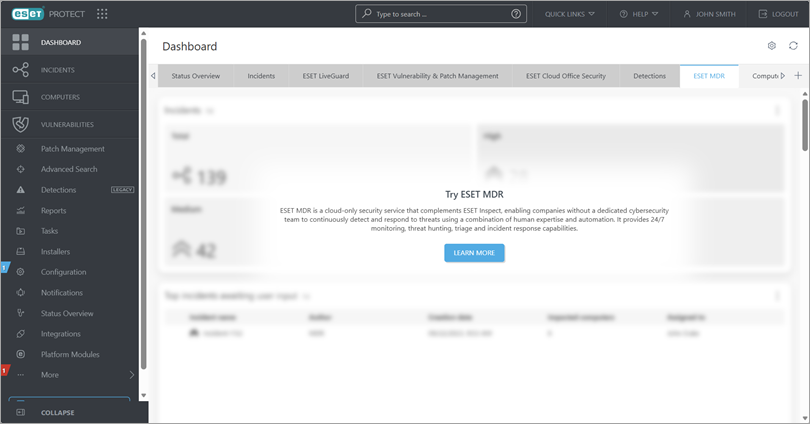
If the service is not activated, the ESET MDR tab is inactive and displays the Try ESET MDR message.