[KB7174] 使用恢复工具修复全磁盘加密主引导记录

注意:

本页已由电脑翻译。点击本页面语言下的英文,显示原文。如果你发现有什么不清楚的地方,请联系你当地的支持。

问题

ESET Endpoint Encryption Client and ESET Endpoint Encryption Server are separate applications from ESET Full Disk Encryption

The article below applies only to the ESET Endpoint Encryption Client or ESET Endpoint Encryption Server and not ESET Full Disk Encryption.

Visit ESET Full Disk Encryption support to view ESET Full Disk Encryption content.

  • 主引导记录 (MBR) 被覆盖,全盘加密 (FDE) 系统不显示启动前登录屏幕
  • 您需要使用恢复工具重建 MBR

解决方案

I.下载并创建 ESET 恢复媒体创建器

  1. Complete the steps in Section I.

  2. 完成第 I 部分后,返回本文并创建恢复媒体日志文件


II.创建恢复媒体日志文件

  1. 插入 ESET 恢复 USB 驱动器并从 USB 启动工作站。

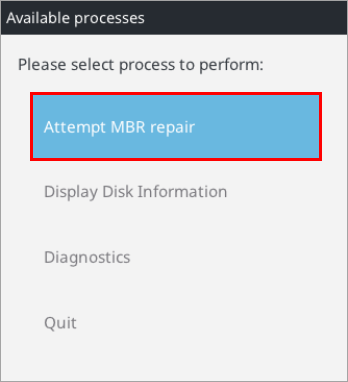
  2. 选择 "尝试 MBR 修复"。

    图 1-1
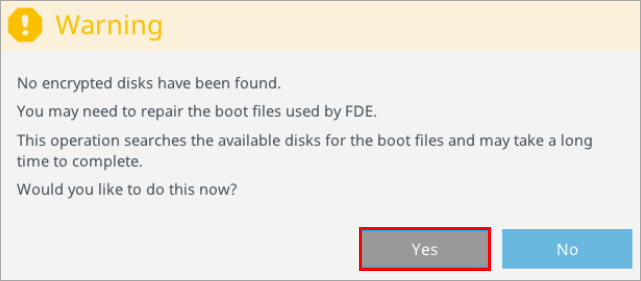
  3. 单击 ""。

    图 1-2
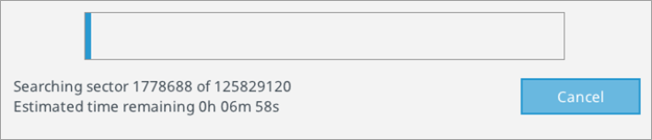
  4. 允许搜索完成。

    图 1-3
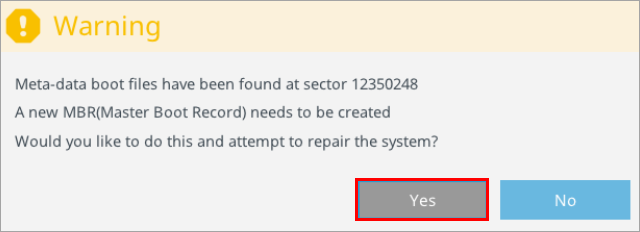
  5. 单击

    图 1-4
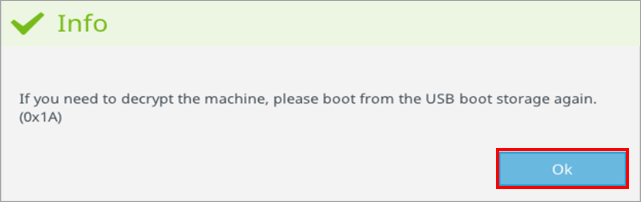
  6. 单击确定

    图 1-5
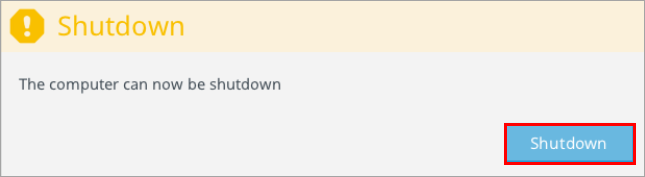
  7. 单击完成

    图 1-6