Issue
- Create a policy for client computers to scan with Always remedy detection enabled
- Configure client computers to automatically remove Potentially Unwanted Applications (PUAs)
Solution


-
Click Policies, select the Built-in policy you want to modify, and then select the check box next to the policy for client computers. Click Actions → Edit.
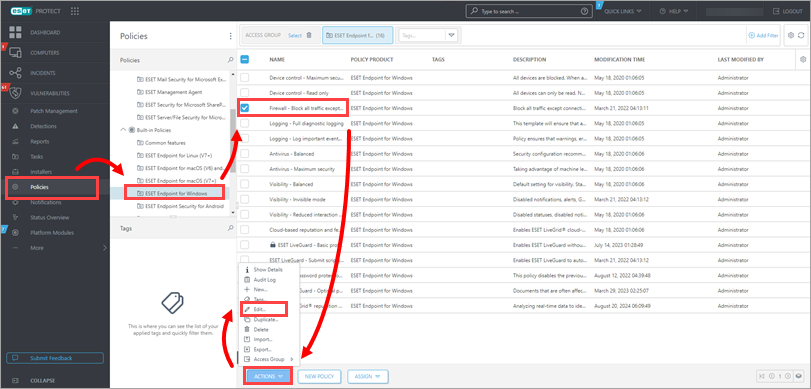
Figure 1-1 -
Click Settings → Protections. Select the radio button below Aggressive, Balanced, or Cautious to enable the detection of Potentially Unwanted Applications, Suspicious Applications, or Potentially Unsafe Applications according to your preference.

Figure 1-2
-
Click Scans → Device scan and select In-depth scan from the Selected profile drop-down menu.

Figure 1-3
-
Expand ThreatSense and select Always remedy detection from the Cleaning level drop-down menu. Click Finish.

Figure 1-4


