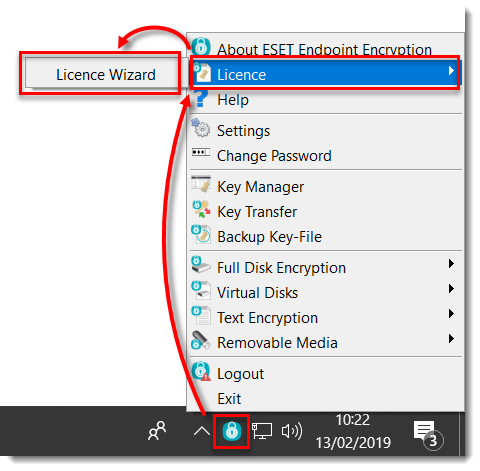
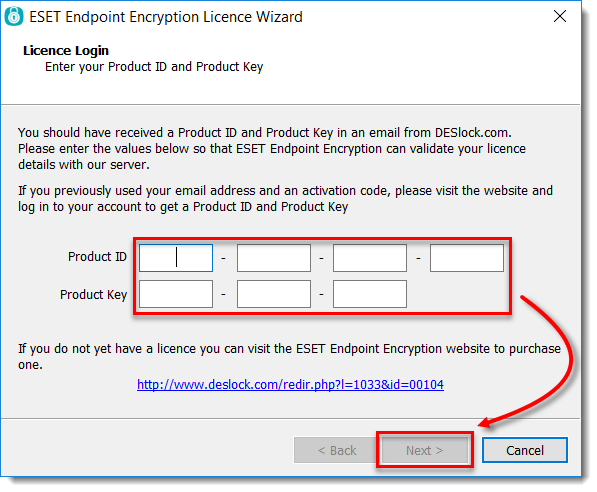
[KB7428] Licentie handmatig bijwerken in ESET Endpoint Encryption (stand-alone)
OPMERKING:
Deze pagina is vertaald door een computer. Klik op English onder Languages op deze pagina om de originele tekst weer te geven. Als u iets onduidelijk vindt, neem dan contact op met uw lokale support.
Uitgave
ESET Endpoint Encryption Client and ESET Endpoint Encryption Server are separate applications from ESET Full Disk Encryption
The article below applies only to the ESET Endpoint Encryption Client or ESET Endpoint Encryption Server and not ESET Full Disk Encryption.
Nadat u een update voor uw ESET Endpoint Encryption (EEE) licentie hebt gekocht, moet u uw licentie in EEE synchroniseren
Dit artikel is van toepassing op stand-alone installaties
Dit artikel is alleen van toepassing op onbeheerde (stand-alone) installaties. Bij beheerde installaties beheert de beheerder de licenties in de EEE Server.