Issue
- Enable and configure HTTPS traffic caching in ESET Bridge while using ESET PROTECT
Solution
- Prerequisites
- Prepare an ESET Bridge certificate for HTTPS traffic caching
- Add the public part of the Certificate Authority to ESET applications via policy in ESET PROTECT
- Enable and configure HTTPS traffic caching in ESET Bridge via policy in ESET PROTECT
I. Prerequisites
- ESET subscription with ESET PROTECT enabled and configured
- ESET Bridge installed
- Public part of the Certificate Authority
- Supported versions of ESET applications installed on endpoint devices. HTTPS traffic caching for module updates and the repository is available only for the ESET applications listed below:
- ESET Endpoint Antivirus/Security for Windows version 10 or later
- ESET Endpoint Antivirus for Linux version 12.2 or later
II. Prepare an ESET Bridge certificate for HTTPS traffic caching
-
The issued certificate must contain the following parameters:
[ req ] distinguished_name = dn req_extensions = v3_req prompt = no [ dn ] CN = ESET Bridge at *.eset.com [ v3_req ] keyUsage = critical,digitalSignature,keyEncipherment,keyAgreement subjectAltName = @alt_names [ alt_names ] DNS.1 = *.eset.com DNS.2 = *.eset.net DNS.3 = *.eset.systems DNS.4 = *.eset.eu DNS.5 = *.update.eset.com DNS.6 = *.cn.eset.com DNS.7 = *.edtd.eset.com DNS.8 = *.edtd.eset.systems -
Ensure that the issued certificate is stored in a
.pfxcontainer.
III. Add the public part of the Certificate Authority to ESET applications via policy in ESET PROTECT
ESET security applications use the Certification Authority to validate the peer certificate from the ESET Bridge policy.
-
Create a policy in ESET PROTECT or ESET PROTECT On-Prem or edit an existing one.
-
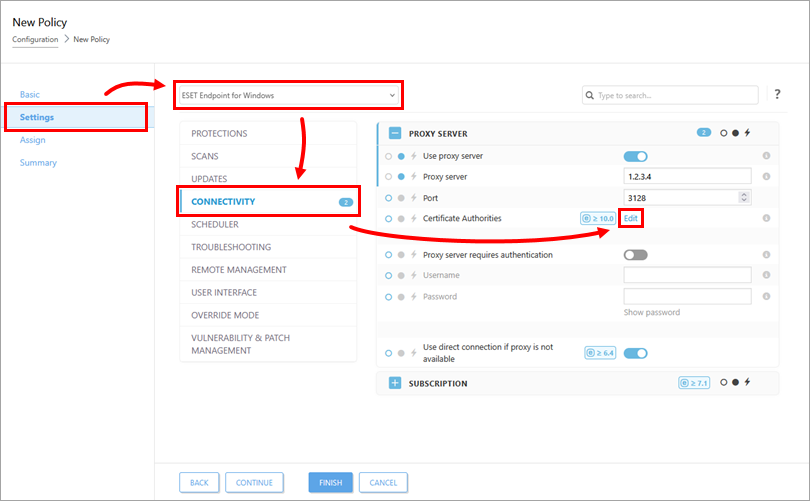
In the Settings section, select ESET Endpoint for Windows or ESET Endpoint for Linux from the drop-down menu, click Connectivity, and click Edit next to Certificate Authorities.
-
Click Add, click the file upload icon, select the
.derfile, and click Save → Save.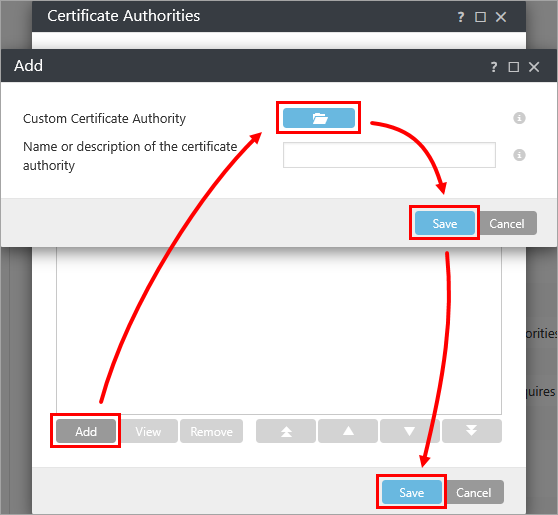
IV. Enable and configure HTTPS traffic caching in ESET Bridge via policy in ESET PROTECT
Enable HTTPS traffic caching and add a certificate to ESET Bridge.
-
Create a policy in ESET PROTECT or ESET PROTECT On-Prem or edit an existing one.
-
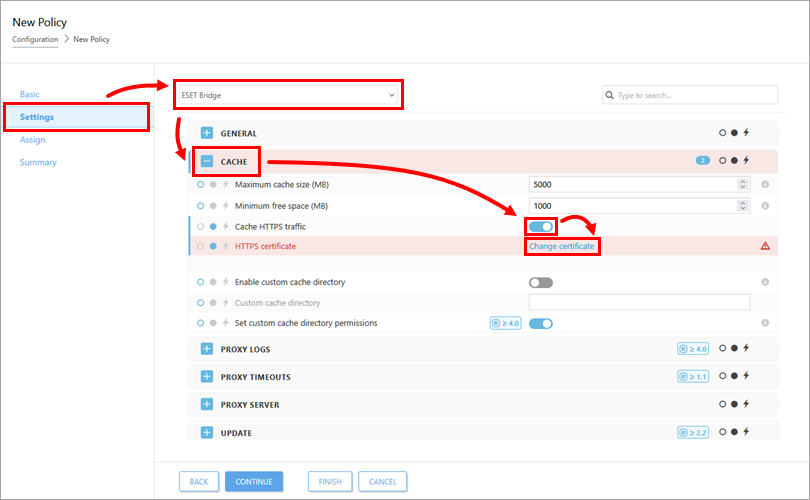
In the Settings section, select ESET Bridge from the drop-down menu, expand Cache, enable the toggle next to Cache HTTPS traffic, and click Change certificate next to HTTPS certificate.
-
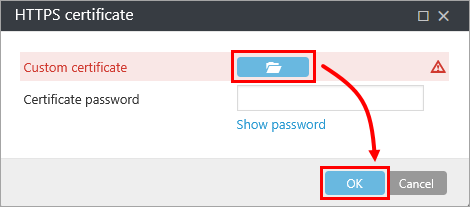
Click the file upload icon, select the
.pfxfile created in section II, and click Save → Save. If the certificate has a password, type the password into the Certificate password field. You can configure additional parameters in the ESET Bridge policy based on your environment.