Issue
- Configure the ESET Endpoint Security firewall on managed devices to allow Remote Desktop Protocol (RDP) connections
- Enable Remote Desktop Protocol (RDP) access for managed devices by adjusting the ESET Endpoint Security firewall rules
Solution
-
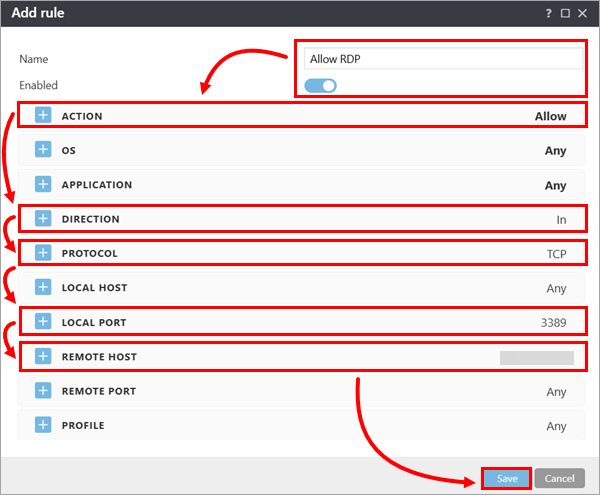
In the Add rule dialog box, configure the rule as indicated below. When you are finished, click Save.
- If needed, modify the rule name and ensure that the Enabled toggle is enabled.
- In the Action section, select Allow.
- In the Direction section, select In.
- In the Protocol section, select TCP.
- In the Local port section, type 3389.
- Optionally, in the Remote host section, type or copy/paste the appropriate IP addresses, address ranges or subnets.
For more information, see Adding or editing Firewall rules.