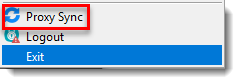
Issue
- Prevent the 'Activation Required' notification from displaying in ESET Endpoint Encryption (EEE) managed clients
Details
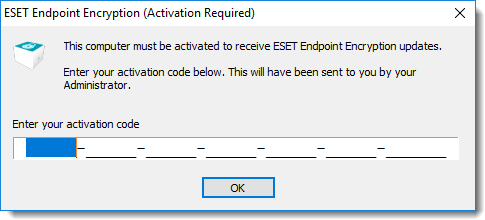
After installing a managed EEE client, the "Activation Required" notification displays to any user of the machine who has not activated their product. If a machine has multiple users and only some use EEE, administrators can prevent the notification from displaying by updating the Workstation Policy.
Solution
- Log in to ESET Endpoint Encryption Server.
- Select Workstation Policy.
- In Front End Settings, select Show Activation User Interface and then click Change Setting.
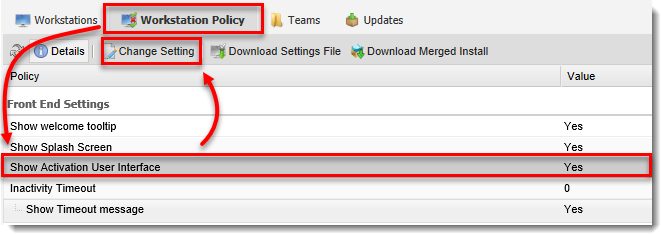
Figure 1-2 - In the Show Activation User Interface window, select No from the drop-down menu.
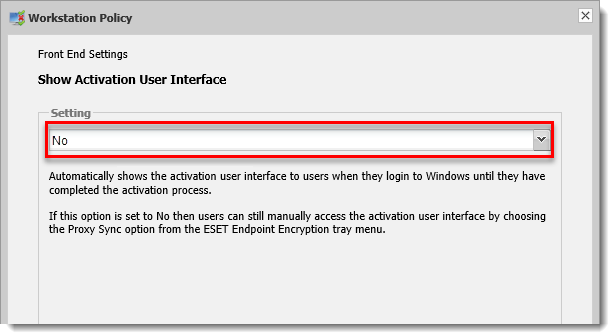
Figure 1-3 - Click OK to apply this setting to future client installs and registry setting files created from the server for clients who use this Workstation policy. To apply this setting to currently activated workstations, select Workstations → Update Policy.
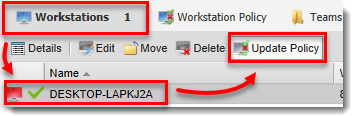
Figure 1-4 - You have successfully disabled the "Activation Required" notification.