Issue
- Disable Real-time Protection temporarily for troubleshooting purposes
Details
Click to expand
Real-time Protection is the first layer of protection that ESET Mobile Security for Android uses to deter threats with no action required by the user.
When Real-time Protection is disabled, you can still use other security features in ESET Mobile Security for Android (for example, you can still perform a scan and remove threats manually), but ESET Mobile Security for Android will not automatically examine newly downloaded files.
Solution
-
Tap Antivirus.
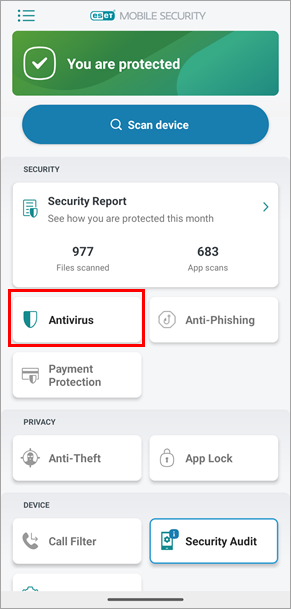
Figure 1-1 -
Tap the menu icon and tap Advanced settings.
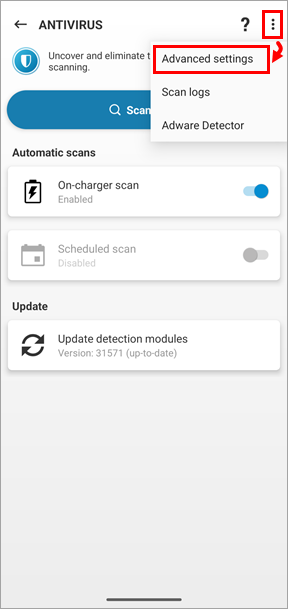
Figure 1-2 -
Tap Real-time protection and select Disabled to disable Real-time protection.
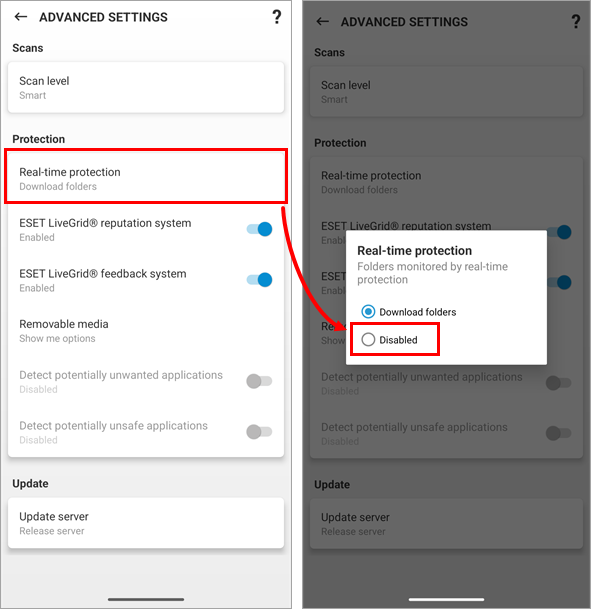
Figure 1-3 -
Restore Real-time protection as soon as possible. Tap Enable from the home screen of ESET Mobile Security for Android.
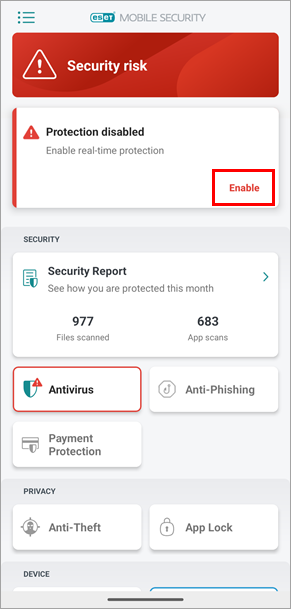
Figure 1-4


