• Home
  • macOS
  • ESET Cyber Security for macOS
  • KB3256

[KB3256] Open the main program window of ESET Cyber Security

Solution

Windows users: Open the main program window of ESET Windows products.

Android users: Open the main program window of ESET Mobile Security for Android.

  1. Click the ESET icon on the menu bar and select Show ESET Cyber Security.
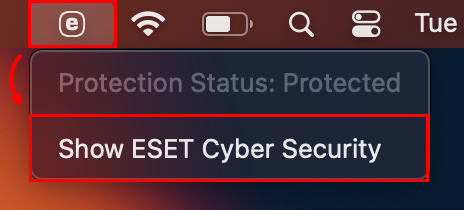
    Figure 1-1
  2. If the ESET icon is not present in the menu bar, open Spotlight by clicking the magnifying glass icon on the menu bar, type ESET and select your ESET product to open it.

Latviešu
Bahasa Indonesia
Česky
Dansk
Deutsch
Eesti
Español
Français
Italiano
Latviešu
Lietuvių
Magyar
Nederlands
Norsk (bokmål)
Polski
Português
Română
Slovenščina
Slovenský
Suomi
Svenska
Türkçe
Ελληνικά Greek
Български Bulgarian
Русский Russian
Українська мова
日本語 Japanese
简体字 simplified Chinese
한국어 Korean
Pēdējoreiz atjaunināts: 2025. gada 15. aug.

Papildu resursi

Lietotāja rokasgrāmatas

ESET forums

YouTube videoklipi

ESET Status Portal ESET Technical Support

Esošais klients?

Kontaktinformācija Konfidencialitāte Juridiskā informācija Ziņot par ievainojamībām Vietnes karte Pārvaldīt sīkfailus

© 1992 - 2026 ESET, spol. s r.o. - Visas tiesības paturētas. Šeit izmantotās preču zīmes ir ESET, spol. s r.o. vai ESET North America preču zīmes vai reģistrētas preču zīmes. Visi pārējie nosaukumi un zīmoli ir to atbilstošo uzņēmumu reģistrētas preču zīmes.