• Home
  • macOS
  • ESET Cyber Security for macOS
  • KB3256

[KB3256] Open the main program window of ESET Cyber Security

Solution

Windows users: Open the main program window of ESET Windows products.

Android users: Open the main program window of ESET Mobile Security for Android.

  1. Click the ESET icon on the menu bar and select Show ESET Cyber Security.
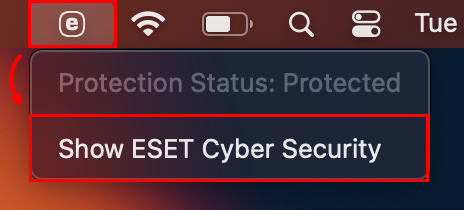
    Figure 1-1
  2. If the ESET icon is not present in the menu bar, open Spotlight by clicking the magnifying glass icon on the menu bar, type ESET and select your ESET product to open it.

English
Bahasa Indonesia
Česky
Dansk
Deutsch
Eesti
Español
Français
Italiano
Latviešu
Lietuvių
Magyar
Nederlands
Norsk (bokmål)
Polski
Português
Română
Slovenščina
Slovenský
Suomi
Svenska
Türkçe
Ελληνικά Greek
Български Bulgarian
Русский Russian
Українська мова
日本語 Japanese
简体字 simplified Chinese
한국어 Korean
Last Updated: Aug 15, 2025

Additional resources

User guides

ESET Forum

YouTube videos

ESET Support News ESET Customer Advisories ESET Status Portal ESET Technical Support

Existing customer?

Contact Privacy Legal information Report vulnerabilities Sitemap Manage cookies

© 1992 - 2026 ESET, spol. s r.o. - All rights reserved. Trademarks used therein are trademarks or registered trademarks of ESET, spol. s r.o. or ESET North America. All other names and brands are registered trademarks of their respective companies.